
Date: 2026-05-27
If you’ve ever opened up a laptop, a smartphone, or a printer, you’ve seen those thin, flat, ribbon‑like cables that connect different parts of the device. They’re not ordinary wires. They’re FPC cables – Flexible Printed Circuit cables.
FPC cables are everywhere in modern electronics. They’re the reason your phone’s display can fold, your laptop’s hinge can swivel, and your printer’s print head can zip back and forth thousands of times without breaking. Let’s explore what FPC cables are, how they’re made, where they’re used, and how to choose the right one for your product.
What Is an FPC Cable?
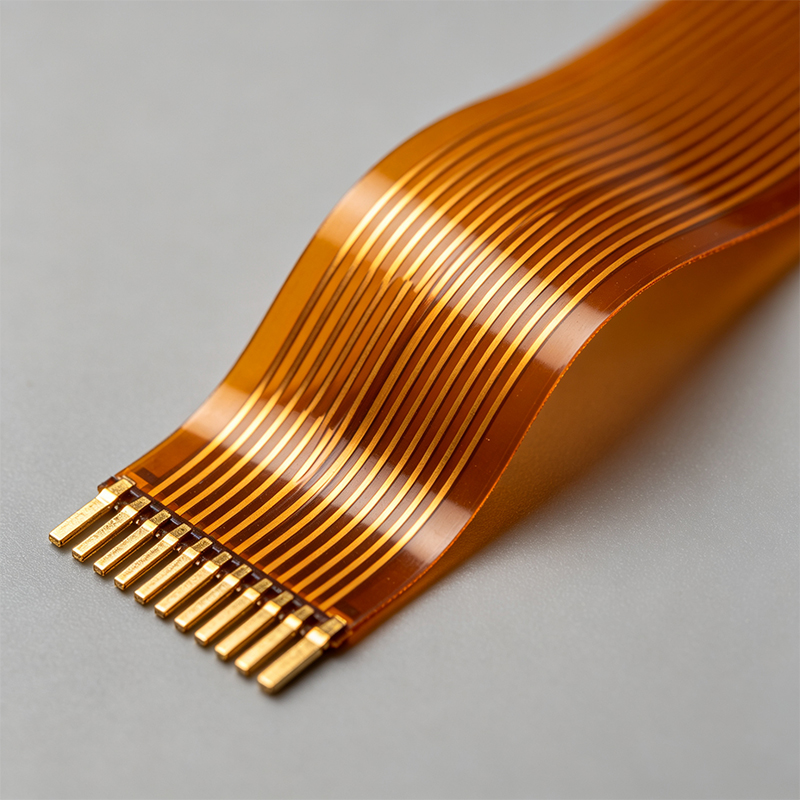
An FPC cable (Flexible Printed Circuit cable) is a thin, flat, flexible interconnect made by etching copper traces onto a polyimide (plastic) film. Unlike a round wire bundle, an FPC cable is flat and can be bent, folded, or twisted to fit into tight spaces.
Think of it as a ribbon cable that’s been flattened, made ultra‑thin, and given the ability to carry dozens of signals simultaneously – all while bending around corners.
FPC cables are often confused with FFC (Flexible Flat Cable). The difference is important:
FFC – A simple laminated cable with straight, parallel conductors. Very cheap, but only straight lines.
FPC – A true flexible circuit board. Traces can be routed in any pattern, and components (resistors, capacitors, connectors) can be soldered directly onto it.
In practice, many people use “FPC cable” loosely for both, but technically FPC is more capable and more expensive.
How Is an FPC Cable Made?
Manufacturing an FPC cable involves several steps, similar to making a flexible PCB:
Base material – A sheet of polyimide film (like Kapton) is coated with a thin layer of copper.
Circuit patterning – Photoresist is applied, exposed to UV light through a mask, and developed. Unwanted copper is etched away, leaving only the desired traces.
Coverlay application – A protective polyimide coverlay (like a flexible solder mask) is laminated over the traces, exposing only the contact pads at the ends.
Surface finish – The exposed pads are plated with gold (ENIG) or tin to ensure good solderability and corrosion resistance.
Cutting – The individual cables are cut from the panel, often using a laser or precision die.
Stiffener attachment (optional) – A small piece of FR4 or polyimide is glued behind the contact area to make insertion into a connector easier.
The result is a thin, durable, flexible cable that can carry signals from one board to another, even through a hinge.
Why Use an FPC Cable Instead of Wires?
Here are the main advantages:
Space saving – FPC cables are extremely thin (often 0.1‑0.3mm). They can snake through narrow gaps where a bundle of round wires wouldn’t fit.
Weight reduction – Replacing a wire harness with an FPC cable can cut weight significantly – important for drones, wearables, and aerospace.
Reliability – FPC cables have fewer connection points. Instead of a wire with two connectors, an FPC cable can be a single continuous circuit. Fewer joints mean fewer failure points.
Consistent impedance – For high‑speed signals (like USB or MIPI), an FPC cable can be designed with controlled impedance (e.g., 50Ω or 100Ω differential pairs), which is difficult with loose wires.
Ease of assembly – Plugging a single FPC cable into a ZIF connector is much faster than routing and crimping a dozen loose wires.
Custom routing – FPC cables can turn corners, branch, and even include components (e.g., a pull‑up resistor or a small capacitor) directly on the cable.
Where Are FPC Cables Used?
You’ll find FPC cables in almost any compact or moving electronic device:
Smartphones – Connecting the main board to the display, camera modules, buttons, and battery.
Laptops and tablets – The cable that goes through the hinge to the screen is almost always an FPC.
Printers – The moving print head uses a long, flexible FPC that bends back and forth thousands of times.
Cameras – Interconnecting the lens module, image sensor, and main board.
Drones – Connecting the flight controller to the ESCs (motor controllers) and camera gimbal.
Wearables – Smartwatches and fitness trackers use FPC cables to wrap around the wrist.
Medical devices – Endoscope cameras and implantable sensors rely on thin, biocompatible FPC cables.
Automotive – Dashboard displays, steering wheel controls, and battery management systems.
Key Specifications of an FPC Cable
When choosing or designing an FPC cable, you’ll need to consider:
Pitch – The distance between the center of one conductor to the next. Common pitches: 0.3mm, 0.5mm, 0.8mm, 1.0mm. Smaller pitch saves space but requires more precise manufacturing and assembly.
Number of conductors – From 4 to over 100, depending on your signal count.
Length – From a few centimeters to 50 cm or more. Longer cables are more expensive and may need shielding.
Copper thickness – Typically 1oz (35µm) or 0.5oz (18µm). Thicker copper handles more current but is less flexible.
Bend radius – The minimum radius you can bend the cable without damaging the copper. Rule of thumb: 5‑10 times the cable thickness.
Dynamic vs. static flex – A cable that bends once during assembly (static) can have tighter bend radius than one that bends repeatedly (dynamic). For dynamic applications, use rolled‑annealed copper.
Stiffener – A small rigid piece behind the contact area to help insertion. Almost always required for ZIF connectors.
Shielding – For EMI‑sensitive signals, an FPC cable can include a shield layer (copper or silver ink) and a ground plane.
FPC Cable Connectors – How Do They Work?
Most FPC cables connect using ZIF (Zero Insertion Force) connectors. You open a small flap, slide the cable end in, and close the flap to clamp the contacts. The connector’s metal pins press against the exposed pads on the cable.
Key points:
One‑sided vs. two‑sided contacts – Most FPC cables have pads on one side only. Some connectors accept double‑side contacts.
Locking type – Flip‑lock (hinged) or slide‑lock. Flip‑lock is more common.
Mating cycles – ZIF connectors are rated for 20‑50 insertions. Not designed for frequent plugging/unplugging.
FPC vs. FFC – A Practical Comparison
| Feature | FPC Cable | FFC (Flexible Flat Cable) |
|---|---|---|
| Construction | Etched copper on polyimide | Laminated parallel conductors |
| Routing | Any pattern (curves, branches) | Only straight, parallel |
| Components | Can have resistors, caps, etc. | No components |
| Flexibility | Excellent | Very good (but uniform) |
| Cost | Higher (custom tooling) | Very low (off‑the‑shelf or simple custom) |
| Lead time | 1‑3 weeks | Days |
| Best for | Complex, high‑density, dynamic flex | Simple, cheap, long, straight connections |
If you need a simple straight connection, an FFC is cheaper. If you need complex routing, components on the cable, or dynamic bending, an FPC is the way to go.
Design Considerations for FPC Cables
If you’re designing a product that uses an FPC cable, keep these rules in mind:
Keep traces perpendicular to the bend axis – Traces running parallel to the bend are more likely to crack. Run them across the bend.
Use teardrops – Where traces meet pads, add teardrops to reduce stress concentration.
Avoid vias in bend areas – Vias create weak points. Place them outside the bend zone.
Add a stiffener – The insertion end must be rigid. A 0.2‑0.3mm FR4 stiffener is standard.
Round corners – Sharp corners on the cable outline can snag on connectors or tear. Use generous radius.
Use coverlay, not solder mask – Solder mask cracks on flex. Use polyimide coverlay.
Specify minimum bend radius – Tell the manufacturer how much the cable will bend in your product. They’ll design the copper and coverlay accordingly.
How to Handle and Install FPC Cables
FPC cables are delicate. Here are practical tips:
Don’t fold them sharply – Exceeding the minimum bend radius will crack the copper.
Don’t pull on the cable – Pull the connector housing, not the cable itself.
Insert straight – When plugging into a ZIF connector, push the cable straight in, not at an angle.
Lock the flap – After insertion, close the latch firmly. A loose latch causes intermittent connections.
Use a pull tab – For cables that need frequent removal, add a small non‑conductive extension to grab.
Avoid kinking – Once creased, the copper may break even if you straighten it.
Real‑World Example: A Laptop Display Cable
Open a laptop. The cable that runs from the motherboard to the screen passes through the hinge. It bends 90 degrees twice and twists slightly as the lid opens and closes – thousands of times over the laptop’s life. That’s a dynamic‑flex FPC cable, often with 40‑80 conductors, 0.5mm pitch, and stiffeners at both ends. It’s designed to survive years of daily use. A round wire harness would be too bulky and would fail much sooner.
Can an FPC Cable Carry Power?
Yes, but with limitations. FPC traces are thin (typically 35µm copper). A 0.2mm wide trace can carry about 0.5‑1A. For higher currents, you need wider traces or multiple traces in parallel. For power above a few amps, a wire or a flexible PCB with heavy copper is better.
What We Offer (Briefly)
We’re a custom circuit board manufacturer specializing in flexible PCBs, rigid‑flex boards, HDI high‑frequency boards, and PCBA. We design and manufacture custom FPC cables for any application – from simple straight jumpers to complex multi‑layer dynamic flex cables with components. We also can assemble your FPC cables with connectors (ZIF, soldered, or board‑to‑board).
Final Answer – What Is an FPC Cable?
An FPC cable (Flexible Printed Circuit cable) is a thin, flat, flexible interconnect made by etching copper traces onto a polyimide film. It can be bent, folded, and routed in any pattern, and it can even include electronic components. FPC cables are used in smartphones, laptops, printers, cameras, drones, wearables, medical devices, and automotive electronics to save space, reduce weight, and improve reliability. They connect to boards using ZIF connectors.

Kaboer manufacturing PCBs since 2009. Professional technology and high-precision Printed Circuit Boards involved in Medical, IOT, UAV, Aviation, Automotive, Aerospace, Industrial Control, Artificial Intelligence, Consumer Electronics etc..


 English



 Wechat
 +86 13670210335
 +86 13670210335
 E-mail