
Date: 2026-06-04
You‘ve probably opened a laptop or a smartphone and noticed multiple circuit boards stacked inside, connected by tiny connectors or flexible cables. That’s "PCB on PCB" in action – a design approach where multiple printed circuit boards work together as a system instead of being one single, giant board.
Think of it like building with LEGO bricks instead of a single solid block. You can swap pieces, upgrade modules, and fit everything into tighter spaces. That‘s exactly why electronics manufacturers use PCB-on-PCB designs — it makes products more modular, easier to manufacture, and simpler to repair. Let’s break down what PCB on PCB actually means, the different ways to connect boards, and how to choose the right method for your product.
What Does "PCB on PCB" Actually Mean?
"PCB on PCB" isn‘t a formal technical term — it’s a practical way of describing situations where one circuit board attaches to another. Each board usually performs a specific function, and when combined, they operate as a complete device.
In a typical setup, one board acts as the main board (often called a motherboard), containing the processor, power management, or key control circuits. The secondary board is often called a daughterboard — a smaller board that provides additional features like sensors, wireless communication modules, or signal conversion circuits.
The connection between boards allows signals, power, and control data to travel between them. Instead of using long cables, engineers prefer direct board-to-board connections, which improve signal stability and reduce noise.
Common PCB-on-PCB Scenarios
Here’s how “PCB on PCB” shows up in real products:
Daughterboard on motherboard – A smaller board plugs into a larger main board (like a Raspberry Pi HAT)
Mezzanine boards – Boards stacked parallel with spacers, connected through connectors (common in servers and networking gear)
Module-on-board – Pre‑built functional modules (like Bluetooth or power modules) mounted on a main PCB
Card-edge connections – Boards sliding into slots on a backplane (like PCIe cards in a computer)
The core idea is the same: instead of cramming everything onto one massive board, you split the system into smaller, interconnected boards that work together.
Why Stack Boards? The Real-World Benefits
Here’s why engineers choose PCB-on-PCB designs:
Space Efficiency – Modern products demand maximum functionality in minimal space. Stacking boards lets you use three dimensions instead of just two. A smartphone would be twice as large if everything had to fit on one plane.
Modularity and Upgradability – When functions are separated onto different boards, you can upgrade or replace individual modules without redesigning everything. Need better wireless? Swap the RF module. Want more processing power? Upgrade the CPU board. This modular approach extends product life and simplifies field service.
Simplified Manufacturing – Smaller boards are often easier to manufacture with higher yields than one massive complex board. If one functional module has issues, you can rework or replace just that board instead of scrapping an entire expensive assembly.
Better Signal Isolation – Sensitive analog circuits can be separated from noisy digital sections on different boards, connected only where necessary. This reduces interference and improves overall performance.
Thermal Management – Heat‑generating components can be placed on separate boards with dedicated cooling, preventing hot spots from affecting sensitive circuits elsewhere.
How to Connect Two PCBs Together – Common Methods
Several techniques are commonly used in industry. Each has its own strengths and weaknesses.
1. Board-to-Board Connectors
This is the most straightforward method. Two boards connect using mating connectors — one soldered to each board. Types include:
Pin header and socket headers – The classic 2.54mm pitch connectors, cheap and reliable for low‑density connections. They‘re widely available and cost‑effective.
Mezzanine connectors – Designed for parallel stacking with controlled spacing, common in computer modules and server applications.
High-speed board-to-board connectors – For signals running at gigabytes per second, with controlled impedance and shielding. Used in high‑density, compact spaces like smartphones and wearables. They can achieve ultra‑fine pitches (0.4mm–1.27mm) and support high‑density signal transmission.
When to use: When boards need to be separable, when you need moderate to high connection counts, or when mechanical stability matters. Choose board‑to‑board connectors for applications requiring high reliability, small pitch, and multi‑layer stacking.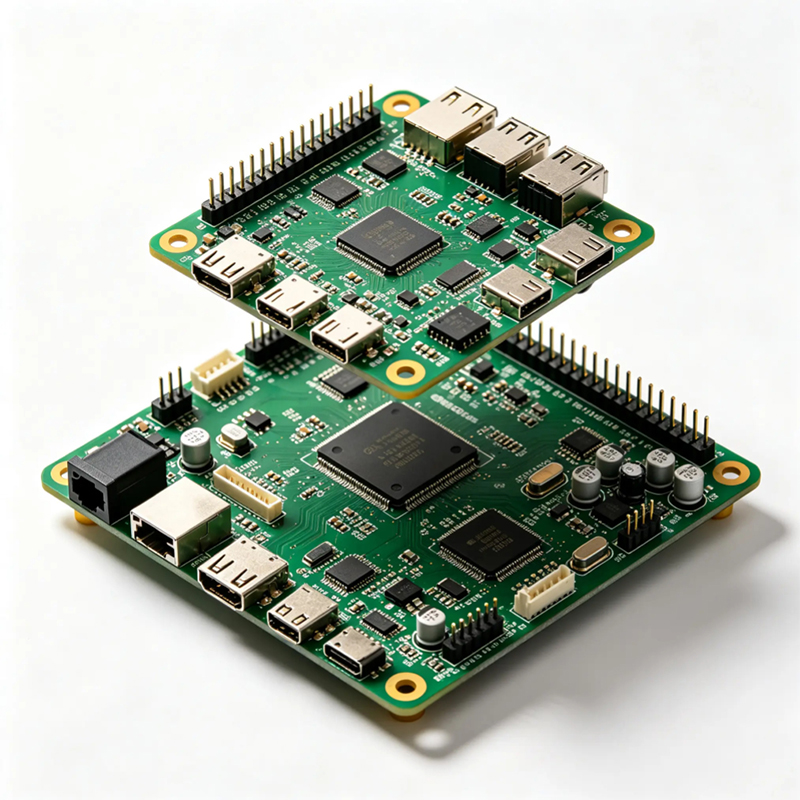
2. Card-Edge Connectors (Gold Fingers)
One board has gold‑plated contacts along its edge that slide into a matching slot on another board. You’ve seen this in every PCIe card and memory module. Advantages: no connector on the daughterboard reduces cost, reliable connection, supports high speeds. PCIe 5.0 and 6.0 continue using this format.
When to use: For modular systems where boards are inserted and removed occasionally, like expansion cards in computers.
3. Castellation / Stamp Hole (Direct Soldering)
This is a clever method often used for small modules. Instead of connectors, the module has “castellated holes” — half‑circle gold‑plated holes along the edges. You solder the module directly onto the main board just like a giant SMD component. It‘s clean, low‑profile, incredibly sturdy, and ideal for high‑shock environments.
When to use: For permanent, high‑reliability connections where you don’t need to remove the module. Common in IoT devices, wireless modules, and compact embedded systems.
4. Vertical/Daughterboard Mounting (Right-Angle Connectors)
Instead of stacking boards parallel, you mount a smaller PCB vertically, at a 90‑degree angle to the main board, using right‑angle connectors. This approach makes efficient use of board space, extending into the width or length dimension rather than adding height. It also provides more breathing room for tall components like large capacitors or heat sinks.
When to use: In narrow enclosures where vertical space is limited but you have room to extend sideways, or when you need to accommodate tall components.
5. Stacking with Standoffs and Pin Headers
This classic method uses brass standoffs to maintain a precise gap between boards, while pin headers provide electrical connections. The stacking method offers design flexibility — modules can be easily swapped, testing individual boards is simple, and it helps product upgrades.
When to use: For low‑density connections, prototypes, or when you need easy disassembly. However, it adds height, so it‘s not ideal for very thin products. Signal integrity can also be affected as long pin headers may introduce impedance issues, especially at high frequencies.
The Trade‑Offs: Which Method Should You Choose?
Here’s a simple guide:
| Method | Best For | Cost | Reliability | Disassembly | Space Use |
|---|---|---|---|---|---|
| Board-to-board connectors | High-density, high-speed, compact | Medium‑high | Very high | Easy | Good |
| Card-edge (gold fingers) | Modular, removable cards | Medium | High | Very easy | Excellent |
| Castellation (stamp hole) | Permanent, shock‑resistant modules | Low | Excellent | Permanent | Very good |
| Vertical daughterboard | Narrow enclosures, tall components | Medium | High | Moderate | Good (uses width) |
| Standoffs + pin headers | Prototypes, low density, easy swapping | Low | Moderate | Very easy | Poor (adds height) |
When PCB-on-PCB Designs Go Wrong (And How to Avoid It)
Even a great design can fail if you ignore a few critical factors:
Planarity – If the module or the mainboard is even slightly warped, the solder joints in a PCB-on-PCB setup will fail. This is why baking processes and copper‑clad laminate selection are critical.
Signal integrity – Long pin headers can introduce impedance mismatches, especially for high‑frequency signals. For high‑speed designs, choose connectors specifically designed for controlled impedance.
Mechanical stability – In high‑vibration environments, always add additional mechanical fixation like screws, standoffs, or glue.
Mis‑insertion – Use asymmetrical pin arrangements or keying features to prevent inserting boards backward.
The Role of Flexible and Rigid‑Flex in PCB-on-PCB Design
Sometimes the “PCB on PCB” isn‘t two rigid boards. We often solder a custom flexible PCB onto a rigid carrier to create a 3D circuit that can fit into curved housings. Flex and rigid‑flex boards are excellent for:
Connecting two rigid boards that sit at different angles (like a laptop screen and base)
Replacing bulky connectors and wiring harnesses with a single, continuous flexible circuit
Creating compact, foldable assemblies where space is extremely limited
As a manufacturer specializing in flexible PCBs, rigid‑flex boards, HDI high‑frequency boards, and PCBA, we use PCB-on-PCB designs every day to help customers save space, reduce cost, and improve reliability.
Real-World Example: A Compact IoT Sensor
A customer needed a compact IoT sensor for industrial monitoring. They originally designed one large 8‑layer board with all functions — processor, wireless module, sensors, and power management. The board was expensive, and any design change required re-spinning the entire board.
We redesigned it as a PCB-on-PCB system: a small, high‑density 8‑layer HDI board for the processor and wireless module, mounted on a low‑cost 2‑layer FR4 carrier board that held the sensors and power management. The two boards were connected with a low‑profile mezzanine connector. The result: the customer saved 40% on board costs, cut development time in half, and can now upgrade the wireless module without redesigning the whole system.
What We Offer – Your PCB-on-PCB Partner
We’re a custom circuit board manufacturer specializing in everything you need for successful PCB-on-PCB designs:
Flexible PCBs – For creating 3D circuits and flexible interconnects
Rigid‑flex boards – Combining rigid sections for components and flexible tails for bending
HDI high‑frequency boards – For the processor modules that need fine lines, microvias, and controlled impedance
PCBA – Full assembly, including soldering castellated modules, mounting connectors, and testing the complete stacked assembly
We provide real DFM feedback — we‘ll look at your design and tell you if the tolerances are too tight before we even start. And as a one‑stop shop, we handle everything from fabricating complex HDI layers to final PCBA assembly. No more finger‑pointing between different vendors.
Ready to Stack Your Boards Smarter?
If you’re trying to cram too many functions onto one massive board, it‘s time to think modular. Send us your schematic or a rough sketch. We’ll recommend the best PCB-on-PCB approach — whether that‘s board‑to‑board connectors, castellated modules, vertical daughterboards, or a rigid‑flex solution — and build it for you, from prototype to production.

Kaboer manufacturing PCBs since 2009. Professional technology and high-precision Printed Circuit Boards involved in Medical, IOT, UAV, Aviation, Automotive, Aerospace, Industrial Control, Artificial Intelligence, Consumer Electronics etc..


 English



 Wechat
 +86 13670210335
 +86 13670210335
 E-mail