
Date: 2026-05-23
If you’ve ever looked closely at a circuit board, you’ve probably noticed tiny holes scattered across the surface. Some are surrounded by a copper ring, some look like little dots. Those are vias (pronounced “vee‑uhs”). They’re one of the most important features on any multi‑layer PCB, yet most people don’t know what they actually do.
Let’s demystify vias – what they are, why they’re essential, the different types, and how to use them correctly in your designs.
What Is a Via?
A via (short for “vertical interconnect access”) is a small hole drilled through a PCB and plated with copper on its inner wall. Its job is to conduct electricity from one layer of the board to another.
Think of a multi‑layer PCB as a multi‑story building. The copper traces on each layer are like hallways on different floors. Vias are the staircases that let you move between floors. Without vias, you couldn’t connect a trace on layer 1 to a trace on layer 3 – each layer would be isolated.
Why Do You Need Vias?
Modern circuit boards often have 4, 6, 8, or even more layers of copper. You can’t fit all the necessary connections on just one or two layers. Vias allow you to:
Route complex circuits – Jump from one layer to another to avoid crossing traces.
Save space – Instead of running long traces around obstacles, you go down a via and come up elsewhere.
Connect power and ground – Distribute voltage or ground across multiple layers.
Heat transfer – Some vias are designed to carry heat away from hot components.
The Anatomy of a Via
A via has a few parts:
Barrel – The copper‑plated wall of the hole that carries current from layer to layer.
Pad – The copper ring on the top and bottom (and inner layers) that connects the barrel to the traces.
Annular ring – The width of copper pad surrounding the hole.
Anti‑pad – A gap in copper planes around the via to prevent shorting.
The Three Main Types of Vias
Not all vias are the same. The three most common types are through‑hole vias, blind vias, and buried vias.
1. Through‑hole via (TH via)
This is the classic via. It goes all the way from the top layer to the bottom layer of the board. You can see the hole clearly on both sides.
Pros – Cheap, easy to manufacture, strong.
Cons – Takes up space on every layer, even layers where it’s not needed.
Best for – Standard multi‑layer boards, prototypes, low‑cost designs.
Through‑hole vias are what you’ll find on most Arduino boards, power supplies, and simple electronics.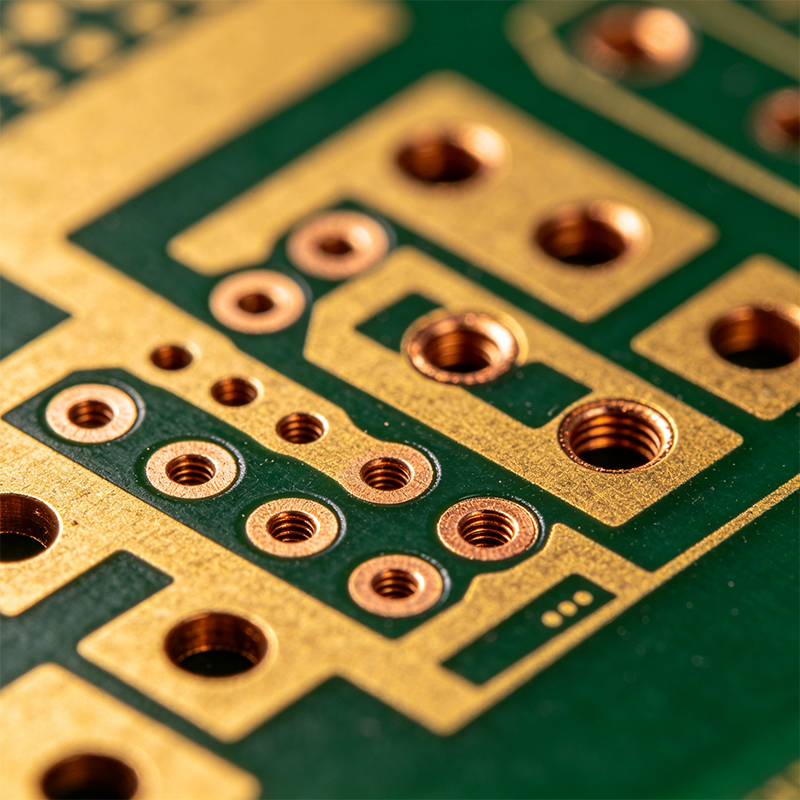
2. Blind via
A blind via starts on an outer layer (top or bottom) and ends at an inner layer. It doesn’t go all the way through the board. You can only see it from one side – the other side looks like a solid copper pad.
Pros – Saves space on layers where the via isn’t needed. Allows higher routing density.
Cons – More expensive to manufacture (requires precise laser drilling or controlled depth drilling).
Best for – HDI boards, smartphones, compact designs.
Blind vias are common in high‑density interconnect (HDI) boards where every square millimeter counts.
3. Buried via
A buried via is completely inside the board – it connects two or more inner layers but does not reach either outer layer. You can’t see it from the outside at all.
Pros – Frees up space on outer layers for components and traces.
Cons – Most expensive type. Requires sequential lamination (build the board in stages).
Best for – Very dense, high‑layer‑count boards like server motherboards or advanced HDI.
Buried vias are invisible once the board is finished. You wouldn’t know they’re there unless you saw the manufacturing stackup.
Specialty Vias (Advanced)
For HDI and high‑frequency boards, you’ll also encounter these:
Microvia – A very small blind or buried via (typically less than 0.15mm diameter). Drilled with a laser, not a mechanical drill. Microvias are the backbone of HDI technology. They allow you to connect adjacent layers without taking up much space.
Stacked via – Multiple microvias placed directly on top of each other to connect more than two layers.
Staggered via – Microvias that are offset (not stacked) to avoid stress concentration.
Via‑in‑pad – A via placed directly inside a surface‑mount component pad. This saves space but requires filling the via with conductive or non‑conductive epoxy so solder doesn’t wick away.
How Are Vias Made?
For standard through‑hole vias:
The board is drilled with a high‑speed carbide drill.
The hole is cleaned (desmeared) to remove any melted resin.
A thin layer of copper is chemically deposited on the hole wall (electroless copper).
The entire board is electroplated, building up the copper thickness inside the hole and on the surfaces.
The outer layers are etched to form traces; the via barrel remains plated.
For blind and buried vias, the process is more complex and often involves multiple lamination cycles. Laser drilling (usually CO₂ or UV) is used for microvias.
What About Unused Vias? Tenting and Plugging
When a via isn’t meant to be soldered or probed, you can “tent” it – cover it with solder mask (the green paint). This prevents accidental solder bridges and protects the via from corrosion. Some vias are “plugged” with epoxy to create a flat surface.
Via Size – How Small Can They Go?
For standard PCBs, a mechanical drill can go down to about 0.2mm (8 mils). For HDI, laser‑drilled microvias can be as small as 0.05mm (2 mils) or even 0.04mm. The smaller the via, the more expensive the process.
Common Problems with Vias
Voids – Air bubbles inside the plated copper can cause intermittent connections.
Poor annular ring – If the drill misses the center, the pad may be too thin or completely missing.
Starved or over‑plated – Too little copper makes a weak via; too much reduces the hole size.
Solder wicking – In via‑in‑pad, solder can flow down the via and leave the joint dry.
Via breakage – Mechanical stress can crack the barrel, especially in flexible PCBs or rigid‑flex transition zones.
Vias on Flexible and Rigid‑Flex PCBs
Flexible circuits use polyimide, not FR4. Drilling and plating vias on flex is trickier. Flex vias are usually plated with softer copper and need special reinforcement (like tear‑drop pads) to prevent cracking when the board bends. For dynamic flex applications (bending repeatedly), try to avoid placing vias in bend areas.
In rigid‑flex boards, vias are only allowed in the rigid sections. Never put a via in the flexible tail – it will crack.
Do You Always Need a Via?
No. For very simple single‑ or double‑sided boards, you may not need any vias (except for through‑hole component leads). For multi‑layer boards, vias are essential. But you can minimize them by careful component placement and routing.
A Real‑World Example: A Smartphone Motherboard
Open a smartphone. The main board is an HDI PCB with 8–12 layers. You’ll see hundreds of tiny microvias – some blind, some buried – all connecting the layers so that the board can be incredibly dense. Without microvias, the phone would be three times thicker.
Final Answer – What Are Vias on a PCB?
Vias are copper‑plated holes that electrically connect different layers of a circuit board. The three main types are through‑hole (all layers), blind (outer to inner), and buried (inner to inner). Advanced HDI boards use microvias (laser‑drilled, very small). Vias are essential for any multi‑layer PCB – they’re the staircases that let signals move between floors.
Next time you see a board with tiny holes, you’ll know those aren’t mistakes. They’re vias, quietly doing the hard work of connecting your device’s brains together.

Kaboer manufacturing PCBs since 2009. Professional technology and high-precision Printed Circuit Boards involved in Medical, IOT, UAV, Aviation, Automotive, Aerospace, Industrial Control, Artificial Intelligence, Consumer Electronics etc..


 English



 Wechat
 +86 13670210335
 +86 13670210335
 E-mail