
Date: 2026-05-18
You have a circuit board that used to work. Now it doesn’t. You’ve checked the power, the chips look fine, no burnt smell. But something’s wrong. Chances are, you’ve got a broken trace.
A broken trace is one of the most common hidden failures in electronics. It’s not dramatic – no smoke, no popping sounds. Just a tiny crack in a copper line that brings everything to a halt. Let’s talk about what a broken trace is, why traces break, and how you can find and fix one without losing your mind.
What Is a Trace on a PCB?
First, a quick refresher. A trace is the thin copper line on a circuit board that carries electricity from one point to another. It’s like a wire, but flat and printed onto the board. Traces connect components – resistors, chips, connectors – so that signals and power can flow where they need to go.
On a typical board, traces are about 0.1 to 0.3mm wide, covered by a green (or other color) solder mask. You usually don’t see them unless you look closely.
What Is a Broken Trace?
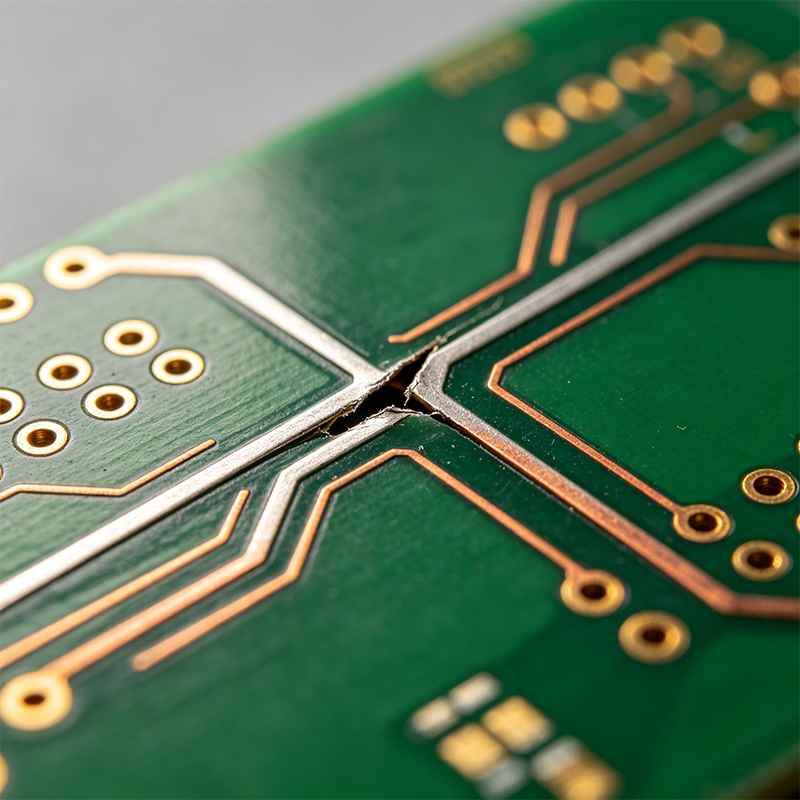
A broken trace is exactly what it sounds like: a crack or gap in that copper path. Electricity can’t jump across the gap (unless the voltage is high enough to create a spark, which is rare in low‑voltage electronics). So the circuit stops working.
Sometimes the break is complete – the trace is split into two separate pieces. Other times it’s a hairline crack that still touches sometimes, causing intermittent problems. The device may work when you wiggle it or when it’s cold, then fail when it warms up. Those are the hardest to find.
How Does a Trace Get Broken?
Traces don’t break for no reason. Here are the usual culprits:
1. Physical damage – Scratches from a screwdriver, dropping the board, bending it too hard, or cutting a trace while trying to cut a wire. This is the most common cause in hobbyist and repair settings.
2. Overheating – If you hold a soldering iron on a trace too long, the copper can delaminate from the board and crack. This often happens when desoldering large components or when someone uses way too much heat.
3. Age and thermal cycling – Over years of heating up and cooling down, the board expands and contracts. Copper traces can fatigue and crack, especially near connectors or stiff components. This is common in old electronics, automotive boards, and anything that gets hot and cold repeatedly.
4. Corrosion – Moisture, salt, or chemicals can eat away copper over time. The trace starts thin, then gets thinner, then breaks. You’ll usually see green or black discoloration around the break.
5. Flexing – On flexible PCBs (the bendable kind), repeated bending can crack traces if the bend radius is too tight or the board is bent too many times. On rigid boards, flexing can happen if the board is mounted in a case that warps or if someone tries to “make it fit” by bending.
6. Manufacturing defects – Rarely, a trace is partially etched or damaged during production. These usually fail early in the product’s life.
What Does a Broken Trace Look Like?
Sometimes you can see it with your naked eye – a visible gap, a dark line, or a place where the copper looks lifted or discolored. But often the crack is too small to see. You might need a magnifying glass, a jeweler’s loupe, or a microscope.
Signs to look for:
A scratch or cut across a trace.
A dark, burnt spot.
Copper that looks lifted or bubbled.
A “shadow” or dull line where the trace seems thinner.
How to Find a Broken Trace (Step by Step)
You can’t fix it until you find it. Here’s how:
Method 1: Visual inspection – Start with a bright light and magnification. Follow the trace from one end (say, a chip pin) to the other (a connector or another component). Look for any interruption.
Method 2: Continuity test with a multimeter – Set your multimeter to continuity mode (the one that beeps). Touch one probe to one end of the trace, the other probe to the other end. If it beeps, the trace is good. If not, it’s broken somewhere. Then you move the probes closer together to narrow down the break.
Method 3: Follow the signal – If you have an oscilloscope, inject a signal at one end and probe along the trace. The signal will disappear after the break.
Method 4: Thermal imaging – A broken trace carrying current may heat up at the break (if it’s making partial contact). A thermal camera can sometimes spot the hot spot.
Method 5: The wiggle test – Gently press or wiggle the board while watching a multimeter connected across the trace. If the beep comes and goes, you’ve got an intermittent break.
How to Fix a Broken Trace
Once you’ve found the break, here are your repair options, from easiest to hardest.
1. Solder bridge (for small gaps) – If the gap is tiny (less than 1mm), you can sometimes bridge it with a blob of solder. Clean the trace on both sides of the break, apply flux, then touch the soldering iron to the gap. Surface tension may pull the solder across the gap. This works for low‑current, non‑critical traces.
2. Jumper wire (the most common fix) – Solder a thin insulated wire (or a piece of bare copper wire) from one side of the break to the other. Scrape away the solder mask on both ends to expose clean copper, tin the pads, then solder the wire in place. This is reliable and works for almost any trace.
3. Trace repair pen or copper tape – Special conductive pens (filled with silver or copper) let you draw a new trace. Or you can cut a tiny strip of copper tape and solder it across the break. These are good for very fine traces where soldering a wire is tricky.
4. Bodge wire (for complex breaks) – If the trace is broken in a hard‑to‑reach area, you can run a wire from the component pin on one side to the component pin on the other side, bypassing the broken trace entirely. This is often the easiest fix for tight spaces.
5. Replace the board – If the board has many broken traces, or if the break is under a large chip where you can’t reach, replacement might be cheaper and faster than repair.
What Not to Do
Don’t use super glue – It doesn’t conduct electricity and will just make a mess.
Don’t scrape too hard – You can lift the trace or damage nearby traces.
Don’t use too much heat – You’ll melt the board or lift the copper.
Don’t ignore the cause – If the trace broke because the board is flexing, a simple repair will break again. You need to fix the mechanical issue first.
Fixing a Broken Trace on a Flexible PCB
Flexible PCBs (the orange or yellow bendy ones) are trickier. The polyimide material is tough, but the copper can crack from repeated bending. Here’s what works:
Use fine, flexible wire – Stranded wire (not solid) is better because it bends without breaking.
Reinforce the repair – Put a small piece of Kapton tape or a drop of flexible epoxy over the repair to protect it from future bending.
Rework the bend radius – If the trace broke because the bend was too tight, redesign the flex to have a larger bend radius. For a repair, add a stiffener near the break to prevent bending at that spot.
Real‑World Example: The Dead Keyboard
A friend’s mechanical keyboard stopped registering the “E” key. He opened it up and found a scratch across a thin trace leading to that switch. The scratch was barely visible. He scraped the solder mask off on both sides of the scratch, tinned the exposed copper, and soldered a tiny piece of wire across the gap. The “E” worked again. Total repair time: 10 minutes. Cost: zero (he used a scrap wire).
How to Prevent Broken Traces in the Future
Be careful when handling boards – Don’t use metal tools to pry or scratch.
Use proper soldering technique – Don’t linger with the iron; use flux to reduce heat time.
Add strain relief – On cables and connectors, use glue or clamps so movement doesn’t transfer to the board.
Support flexible PCBs – Use stiffeners under connectors and avoid bending too tight.
Conformal coating – A thin protective layer can reduce corrosion and physical damage.
When Is a Broken Trace Not Worth Fixing?
If the board is very cheap (like a $5 power supply or a disposable toy), just replace it. If multiple traces are broken, or the board is burned or water‑damaged, repair may be futile. And if the break is under a large surface‑mount chip (like a BGA or a QFP), you probably can’t reach it without removing the chip – which is a whole other level of difficulty.
Final Answer – What Is a Broken Trace on a PCB?
A broken trace is a crack or gap in the copper pathway on a circuit board. It stops electricity from flowing, causing the circuit to malfunction. Traces break from physical damage, overheating, corrosion, flexing, or age. You can find a broken trace using a multimeter’s continuity test and visual inspection. You can fix it by soldering a jumper wire, using a conductive pen, or bypassing the break with a wire. For flexible PCBs, use stranded wire and reinforce the repair.
With a little patience and a steady hand, most broken traces can be repaired. You don’t need to throw away a whole board for one tiny crack.

Kaboer manufacturing PCBs since 2009. Professional technology and high-precision Printed Circuit Boards involved in Medical, IOT, UAV, Aviation, Automotive, Aerospace, Industrial Control, Artificial Intelligence, Consumer Electronics etc..


 English



 Wechat
 +86 13670210335
 +86 13670210335
 E-mail