
Date: 2026-05-15
You look at a circuit board. It’s covered with tiny black boxes, little silver cylinders, and squiggly lines. What are all these things? And what do they actually do?
If you’ve ever felt lost staring at a PCB, you’re not alone. But once you learn a handful of common electronic components, the whole board starts to make sense. Let’s walk through the basic parts you’ll find in almost every electronic device – from a TV remote to a laptop to a car’s engine computer.
1. Resistors – The Traffic Cops of Electricity
A resistor does exactly what its name says: it resists the flow of electric current. Think of it like a narrow spot in a river – it slows down the water.
Why do we need that? Because components like LEDs or chips need just the right amount of current. Too much, and they burn out. Too little, and they don’t work. Resistors set the right amount.
What they look like: Tiny cylinders with two wire leads and colored bands around the body. Or even smaller black rectangles for surface‑mount boards.
What the colored bands mean: They’re a code for the resistance value (in ohms). You can look up a resistor color code chart online.
Common uses: Limiting current to LEDs, pulling voltage up or down on chip inputs, dividing voltage.
2. Capacitors – The Temporary Batteries
A capacitor stores electrical energy temporarily. Think of it like a tiny, fast‑charging battery. It can soak up extra voltage and release it when needed.
Capacitors are great for smoothing out bumps in power supply voltage, filtering noise, and storing a little energy for quick bursts.
What they look like: Small cylinders (like a tiny can) with two leads – these are electrolytic capacitors and have a polarity (+ and -). Or small yellow or brown discs – these are ceramic capacitors, no polarity.
Common uses: Smoothing power supply ripple, blocking DC while passing AC (like in audio circuits), timing circuits, and filtering noise.
3. Diodes – The One‑Way Gates
A diode lets current flow in only one direction. It’s like a check valve for electricity. If you try to push current backward, the diode blocks it.
What they look like: Small cylinders with a silver or black band on one end. That band marks the cathode (negative side). Surface‑mount diodes look like tiny black rectangles with a line on one end.
Common uses: Protecting circuits from reverse polarity (if you plug in a battery backward), converting AC to DC (rectifiers), and freewheeling in motor or relay circuits to prevent voltage spikes.
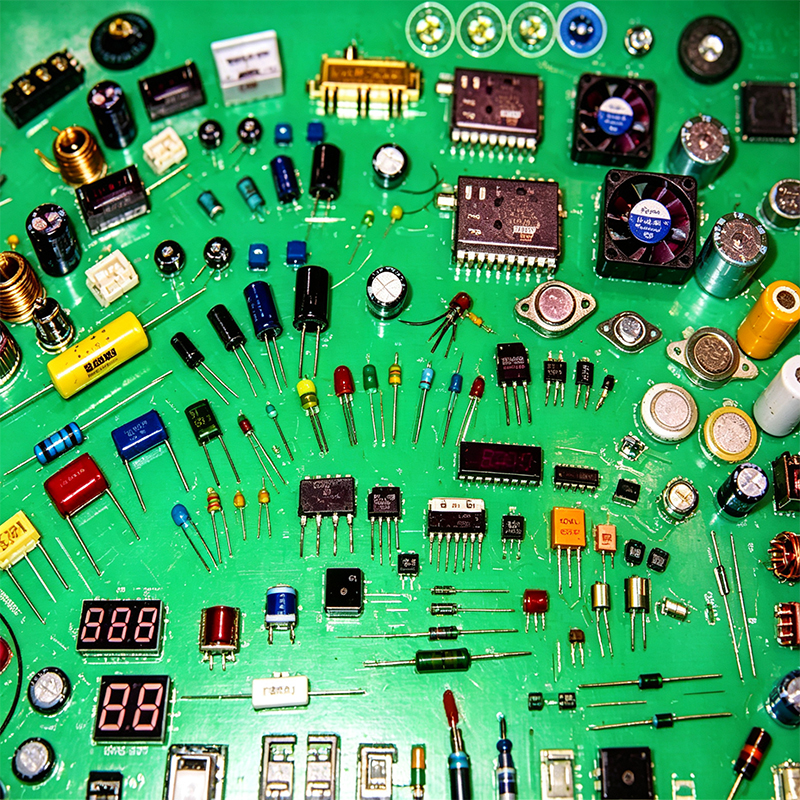
4. Transistors – The Electronic Switches (and Amplifiers)
A transistor can act as a switch or an amplifier. In digital circuits, it turns on or off like a tiny, super‑fast light switch. In analog circuits, it takes a small signal and makes it larger.
Most chips you see today contain millions or billions of transistors inside them.
What they look like: Small black plastic cases with three legs. Common types are TO‑92 (small, half‑cylinder) or SOT‑23 (tiny surface‑mount). Sometimes they have a metal tab for heat dissipation.
Common uses: Turning a motor on/off with a microcontroller, amplifying audio signals, building logic gates inside processors.
5. Integrated Circuits (ICs / Chips) – The Brains
An integrated circuit is a tiny package that contains a complete electronic circuit – sometimes thousands or millions of transistors, resistors, and capacitors – all etched onto a single piece of silicon.
Think of it as a pre‑built function in a box. The “black blob” you sometimes see on a board is a bare chip covered in epoxy (that’s called chip‑on‑board).
What they look like: Black rectangular or square plastic packages with rows of metal legs sticking out from the sides (DIP, SOIC, QFP) or tiny balls underneath (BGA). The top is usually marked with a dot or notch to show pin 1.
Common uses: Microcontrollers (the brain of a device), memory chips, amplifiers, voltage regulators, WiFi modules – almost everything smart.
6. Inductors – The Magnetic Energy Storers
An inductor stores energy in a magnetic field when current flows through it. It resists changes in current – it tries to keep current flowing steadily.
What they look like: A coil of wire, often wrapped around a magnetic core (a small donut or block). Surface‑mount inductors look like small black boxes with a white marking on top.
Common uses: Power supplies (switching regulators), filters, transformers, and radio frequency circuits.
7. Transformers – The Voltage Changers
A transformer uses magnetic fields to transfer energy between two separate coils of wire. It can increase (step‑up) or decrease (step‑down) AC voltage.
What they look like: Two or more coils of wire wrapped around a common magnetic core – usually a black or gray block with metal pins or wires coming out. Power transformers are big; signal transformers are small.
Common uses: AC power adapters (wall warts), isolating circuits, audio impedance matching.
8. Relays – The Remote‑Controlled Switches
A relay is an electrically operated switch. A small current flowing through its coil creates a magnetic field that pulls a mechanical contact closed (or open). That contact can handle much larger currents.
What they look like: A small rectangular plastic box, often clear or blue, with metal pins on the bottom. You can sometimes see the coil and contact mechanism inside.
Common uses: Turning on a high‑power device (like a motor or heater) with a low‑power signal from a microcontroller. Also used in cars for headlights, starters, etc.
9. Connectors – The Bridges Between Parts
Connectors let you join different parts of a circuit without soldering. They come in endless shapes – for wires, for circuit boards, for USB cables, for displays.
What they look like: Plastic housings with metal pins or sockets inside. Examples: pin headers (rows of little metal pins), USB ports, audio jacks, FPC connectors (tiny flip‑lock ones for flat cables).
Common uses: Connecting a battery to a board, plugging in a USB cable, attaching a display ribbon cable.
10. LEDs (Light‑Emitting Diodes) – The Lights
An LED is a special diode that emits light when current flows through it. They’re efficient, last a long time, and come in any color.
What they look like: Small plastic domes (through‑hole) or tiny flat rectangles (surface‑mount) with two contacts. The longer lead is the anode (+), the shorter is the cathode (-). Surface‑mount LEDs often have a green dot or a notch on the cathode side.
Common uses: Indicators (power on, status), backlights, flashlights, decorative lighting.
11. Crystals and Oscillators – The Heartbeats
Many digital circuits need a clock signal – a steady, regular pulse that keeps everything in sync. A crystal (usually quartz) vibrates at a precise frequency when you apply voltage. An oscillator is a crystal plus some supporting electronics.
What they look like: A small silver metal cylinder (through‑hole) or a tiny silver/gray rectangular package (surface‑mount) marked with a frequency like “16.000” or “25.000”.
Common uses: Generating the clock for microcontrollers, timing in watches, radio frequency reference.
12. Potentiometers – The Adjustable Resistors
A potentiometer (or “pot” for short) is a resistor whose value you can change by turning a knob or sliding a lever. Inside, a wiper moves across a resistive track.
What they look like: A round or rectangular plastic box with three pins underneath and a knob or a screwdriver slot on top. Some are tiny trimmer pots meant for one‑time calibration.
Common uses: Volume control on a radio, brightness control on a lamp, adjusting settings on a power supply.
Quick Summary Table
| Component | Job | Looks like |
|---|---|---|
| Resistor | Limits current | Cylinder with colored bands, or tiny black rectangle |
| Capacitor | Stores energy temporarily | Small can (polarized) or disc (non‑polarized) |
| Diode | Lets current flow one way | Cylinder with a band, or tiny rectangle with a line |
| Transistor | Switches or amplifies | Three‑legged black half‑cylinder or tiny flat package |
| IC / Chip | Contains a whole circuit | Black rectangle with many legs or balls |
| Inductor | Stores energy in a magnetic field | Coil of wire or black box |
| Transformer | Changes AC voltage | Two coils on a common core |
| Relay | Electrically operated switch | Plastic box with visible coil inside |
| Connector | Joins parts without soldering | Plastic housing with metal pins/sockets |
| LED | Emits light | Plastic dome (longer lead = +) or tiny flat rectangle |
| Crystal | Provides a steady clock pulse | Silver cylinder or small gray rectangle |
| Potentiometer | Adjustable resistor | Knob or screw slot with three pins |
Putting It All Together
When you look at a circuit board, you won’t see every component at once. But you’ll start to recognize patterns:
The little cylinders with stripes are resistors.
The small cans or discs are capacitors.
The black rectangles with many legs are chips (ICs).
The ones with three legs are probably transistors (or voltage regulators).
The shiny silver cylinder or small gray block might be a crystal.
The thing that lights up is an LED.
Why Learn These?
Understanding basic components helps you:
Read schematics and circuit diagrams.
Fix simple problems (like a bulging capacitor or a burnt resistor).
Build your own gadgets on a breadboard.
Talk to engineers about your product ideas.
A Quick Safety Note
Some components (like large capacitors) can hold a charge even after power is removed. That charge can give you a nasty shock. Always discharge capacitors before touching them. And never touch a circuit while it’s powered on unless you know what you’re doing.
Final Answer – What Are Common Electronic Components?
Common electronic components are the basic building blocks of every circuit. Resistors limit current. Capacitors store energy. Diodes control direction. Transistors switch and amplify. ICs are mini‑circuits. Inductors and transformers work with magnetic fields. Relays are remote switches. Connectors join things. LEDs light up. Crystals keep time. And potentiometers let you adjust things.
Once you know these, a circuit board stops being a mess of random parts. It becomes a story – each component doing its job to make your device work.
Now go find an old remote control or a broken toy, open it up, and see how many of these you can spot. Happy exploring!

Kaboer manufacturing PCBs since 2009. Professional technology and high-precision Printed Circuit Boards involved in Medical, IOT, UAV, Aviation, Automotive, Aerospace, Industrial Control, Artificial Intelligence, Consumer Electronics etc..


 English



 Wechat
 +86 13670210335
 +86 13670210335
 E-mail