
Date: 2026-03-21
If you've ever looked at a circuit board, you've seen it. Those white letters and lines that label every component, show you which way the diode faces, and tell you where to probe. That's silkscreen.
Most people don't think about it much—until something goes wrong. When a batch of boards comes back with blurry text that you can't read, or when your assembly technician spends extra minutes hunting for component locations, suddenly that "just printing" becomes very important.
Let's talk about what silkscreen actually does, how it's made, and what you need to know to get it right.
Silkscreen (sometimes called legend or nomenclature) is the layer of text and symbols printed on a circuit board. It's usually white, but you'll sometimes see yellow, black, or other colors depending on the board's solder mask.
Its job is simple: tell people what goes where . It shows component outlines, reference designators (R1, C5, U3), polarity indicators, test points, logos, and version numbers.
Think of it as the instruction manual printed right on the board. Without it, assembly becomes a guessing game. Technicians would have to flip between your schematic and the physical board, trying to figure out which resistor is R1 and which way the diode faces. With it, they can work quickly and confidently.
Good silkscreen isn't just about looks—it's about efficiency and reliability.
Assembly speed. When components are clearly labeled, operators don't waste time hunting for locations. A well-marked board can shave minutes off each assembly, and those minutes add up fast when you're making hundreds or thousands of boards.
Fewer errors. Clear polarity marks prevent diodes and capacitors from being installed backward. Visible component outlines help operators spot a misplaced part before it's soldered.
Easier troubleshooting. When something fails, test engineers and technicians use the silkscreen to find test points, identify components, and follow signals. Blurry or missing labels make debugging a nightmare.
Professional appearance. Let's be honest—a clean, readable silkscreen makes your product look like it was built by people who care. It's a small detail that speaks volumes about your quality standards.
There are a few ways to apply silkscreen, and the method affects what's possible.
The traditional method. Ink is forced through a fine mesh screen onto the board. It's cost-effective for high volume but limited in resolution. Minimum line width is typically around 0.15-0.18mm (6-7 mils), and fine details can get blurry. This method is still common for simpler boards where high resolution isn't critical .
A photosensitive epoxy ink is applied to the board, then exposed through a film and developed. This offers better resolution than screen printing, with minimum line widths down to 0.1mm (4 mils) . It's more expensive but gives cleaner, sharper text and is widely used for boards with fine-pitch components .
Inkjet technology that prints silkscreen directly onto the board. This is the most precise method, capable of line widths down to 0.075mm (3 mils) . It's fast, flexible, and great for prototypes or boards with very fine text. The downside is higher cost per board, especially at scale .
The choice depends on your board's density, your volume, and how fine your text needs to be.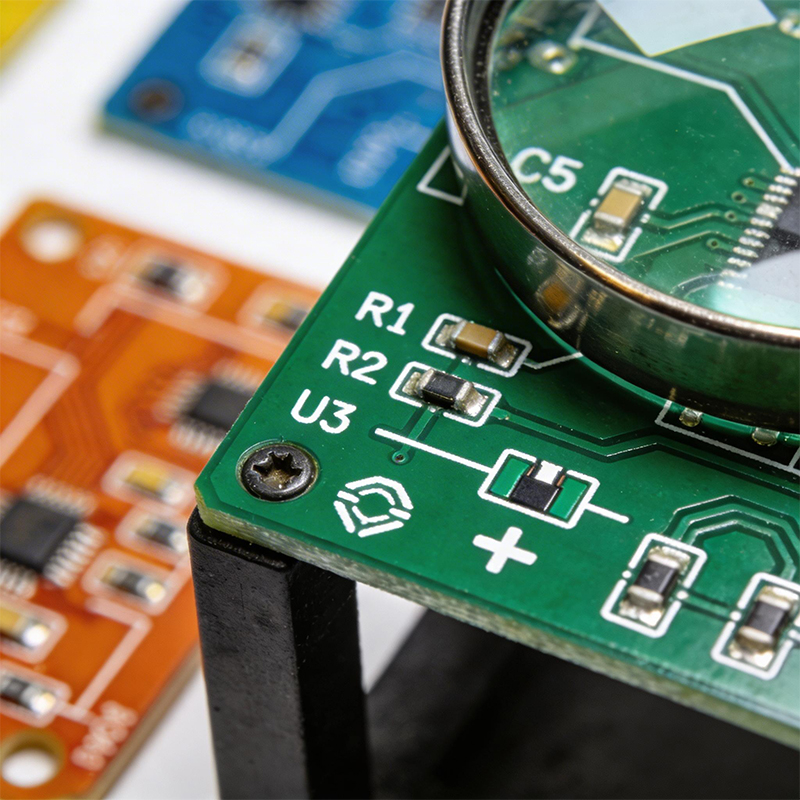
The most common silkscreen problems come from designs that ignore manufacturing realities. Here's what to keep in mind.
If your text is too small, it won't be readable. The minimum character height and line width depend on the printing method, but as a rule of thumb:
For screen printing: Characters should be at least 1.0mm (40 mils) tall, with line width at least 0.15mm (6 mils)
For LPI or DLP: You can go smaller—0.8mm (32 mils) height, 0.1mm (4 mils) line width
When in doubt, make it bigger. A slightly larger character never hurt anyone. A character that's too small is useless.
Silkscreen should never overlap with solder pads. If ink gets on a pad, it can contaminate the solder joint, causing poor wetting or complete failure. Most PCB software has design rule checks for this, but it's worth a visual check before you send your files.
Silkscreen under a component is just wasted ink. Once the part is soldered, the text disappears. Keep component labels and outlines outside the component footprint so they remain visible after assembly.
Text too close to the edge can get cut off during board separation or covered by mounting hardware. Leave a margin—typically at least 0.5mm (20 mils) from the board outline.
Fancy script fonts might look nice on your screen, but they don't print well. Stick with simple, sans-serif fonts like Arial, Helvetica, or vector fonts designed for PCB work. The goal is readability, not artistic expression.
Solid (filled) fonts are easier to read and more reliable to print. Hollow (outlined) fonts need larger dimensions to be legible and are harder for manufacturers to produce cleanly.
You designed text at 0.5mm height thinking it would be fine. The boards come back and you can barely read it.
Solution: Check your manufacturer's minimum specifications before finalizing your design. If you're using standard screen printing, 1.0mm is the safe minimum.
Your layout looked clean on screen, but the silkscreen overlaps pads that need to be soldered.
Solution: Use design rule checks that enforce silkscreen-to-pad clearance. In your PCB software, set rules to keep silkscreen at least 0.15mm (6 mils) from any pad.
Text is rotated in different directions, making the board harder to read during assembly.
Solution: Set a standard orientation—usually 0° (horizontal) or 90° (vertical)—and stick to it across the entire board. Avoid upside-down text unless there's a good reason.
You placed reference designators under the parts they label. After assembly, the text disappears.
Solution: When you do your final layout check, use 3D view or look carefully at component outlines to ensure text is outside component boundaries.
The manufacturer couldn't print your tiny, thin-lined text reliably, so it came out smudged or missing.
Solution: Design with your manufacturer's capabilities in mind. If you need very fine text, ask about DLP or LPI options before you design.
A complete silkscreen should include:
Reference designators for every component (R1, C5, U3, etc.)
Polarity indicators for diodes, electrolytic capacitors, and ICs
Test point labels (TP1, TP2) so technicians know where to probe
Board version and date for traceability
Your logo for branding
Regulatory marks like CE, FCC, or RoHS if required
Connector labels (J1, POWER, USB) to guide assembly and use
You don't need every possible marking, especially on dense boards. Prioritize what's essential for assembly and troubleshooting. Less critical information can go in your documentation.
Flexible circuits add another layer of complexity. The same design rules apply, but you have to consider the flexible material. Polyimide films don't hold ink the same way rigid FR-4 does, and the printing process is different.
For flex circuits, silkscreen is often applied using similar methods, but fine details can be harder to achieve. If your flexible board requires silkscreen, talk to your manufacturer early about their capabilities and limitations.
At Kaboer, we've been manufacturing circuit boards since 2009. Based in Shenzhen with our own PCBA factory, we understand that silkscreen isn't just about looking pretty—it's about making your boards easier to assemble and maintain.
We offer multiple silkscreen options to match your needs:
Standard screen printing for cost-effective, high-volume production with clear, legible text
Liquid photo imaging for boards with fine-pitch components where you need sharper text
Direct legend printing for prototypes and high-density designs requiring the finest resolution
We review your silkscreen design before production, checking for clearance violations, text size, and placement issues. Our goal is to catch problems before they become expensive—not after your boards are already built.
If you're working on a project and want to make sure your silkscreen is done right, send us your requirements or Gerber files. We'll review your design, give you honest feedback, and get back to you with a quote. We've been at this for over 15 years, and we believe the best partnerships start with straightforward conversations.
And if you're ever in Shenzhen, we'd be happy to show you around our factory and walk you through how we print silkscreen—from file to finished board.

Kaboer manufacturing PCBs since 2009. Professional technology and high-precision Printed Circuit Boards involved in Medical, IOT, UAV, Aviation, Automotive, Aerospace, Industrial Control, Artificial Intelligence, Consumer Electronics etc..


 English



 Wechat
 +86 13670210335
 +86 13670210335
 E-mail