
Date: 2026-06-11
You're ordering a PCB. You see an option that says "Board Thickness" with numbers like 1.6mm, 1.0mm, 0.8mm. You pick 1.6mm because that's what everyone uses. But is that always the right choice?
The truth is, picking the wrong thickness can cause problems. Your board might not fit the enclosure. Or it might be too flimsy and crack. Or too thick and heavy.
In this guide, I'll explain everything you need to know about circuit board thickness in plain English. No engineering degree required. Just practical advice you can use right away.
PCB thickness is the total height of the board from top to bottom. It includes everything: copper layers, insulating material (usually FR4 fiberglass), solder mask, and silkscreen.
Think of a PCB like a layer cake:
Copper traces = thin chocolate layers
FR4 insulator = cookie layers
Solder mask = frosting on top
The number you see on a quote, like 1.6mm, is the nominal thickness. The actual board may vary by about ±10% due to manufacturing tolerances.
Here are the standard thicknesses you'll see from most PCB manufacturers:
| Thickness | Inches | Typical Use |
|---|---|---|
| 1.6mm | 0.063" | Standard boards – computer motherboards, power supplies, dev boards |
| 1.2mm | 0.047" | Slightly thinner – routers, set‑top boxes, consumer electronics |
| 1.0mm | 0.039" | Thin – phone sub‑boards, LED light boards, sensors |
| 0.8mm | 0.031" | Thinner – smartwatches, wearables, miniature devices |
| 0.6mm | 0.024" | Very thin – SIM card trays, ultra‑thin remotes |
| 2.0mm | 0.079" | Thicker – high‑current power supplies, automotive, boards needing extra strength |
Thinner than 0.6mm is possible (like 0.4mm or 0.3mm) but those are harder to manufacture and more expensive. Flex PCBs are a different story – they can be 0.1mm thick.
The 1.6mm standard comes from an old US measurement: 1.6mm = 1/16 inch. Back in the early days of PCB manufacturing, that was the common spec, and it stuck.
Why is 1.6mm so popular?
Strong enough for most board sizes – doesn't bend easily.
Great compatibility – most connectors, card slots, and mounting rails are designed for 1.6mm.
Cheapest – because it's the most common, factories stock the materials and charge less.
So if you're not sure what thickness to pick, 1.6mm is a safe bet for most projects.
A board that's too thin becomes floppy.
Imagine a 10cm x 10cm board at 0.6mm thick. You can bend it like a credit card. If you solder heavy components (transformers, large capacitors) on it, the board will warp. Over time, solder joints can crack.
Thin boards also have problems during assembly. They warp in the reflow oven – the board curls up, causing components to shift or tombstone.
So unless your product has very tight space constraints, avoid going below 1.0mm for most rigid PCBs.
Thick boards are strong and resist warping. But they have downsides:
Take up space – might not fit in your enclosure.
Heavy – 1.6mm vs 0.8mm doubles the weight.
Harder to drill – small holes (0.2mm) are more likely to break when drilling thick boards.
High aspect ratio vias – the copper plating may not reach the center of thick holes, causing bad connections.
For portable devices or anything where weight and thickness matter, you want the thinnest board that still works reliably.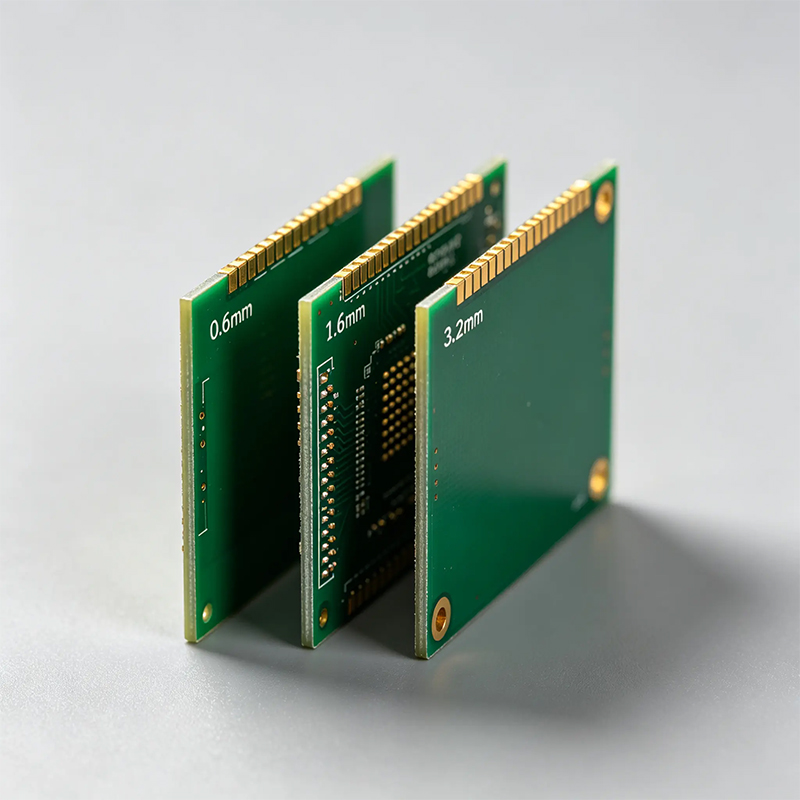
Beyond "just pick 1.6mm", here are real reasons to change thickness:
Number of layers
More layers = thicker board. A 4‑layer board is about 0.3‑0.4mm thicker than a 2‑layer board. An 8‑layer board might be 1.6mm or even 2.0mm. If you need many layers, you can't go super thin.
Copper weight
Copper is measured in ounces (1oz = 35µm thick). If you need 2oz or 3oz copper for high current, each extra ounce adds about 35µm. Not a lot, but it adds up with multiple layers.
Material type
Standard FR4 is flexible with thickness. But high‑frequency materials like Rogers come in fixed core thicknesses (e.g., 0.254mm, 0.508mm). You have to stack prepreg sheets to reach your target, which limits your options.
Connector or slot requirements
If your board plugs into a standard PCIe slot, memory slot, or card guide, the thickness is fixed. For example, PCIe cards must be 1.6mm ±0.1mm. Pick 1.2mm and the card will wobble.
Arduino UNO – 1.6mm
Standard mouse PCB – 1.0mm or 0.8mm
Smartphone main board – 0.8mm to 1.0mm (some flagships use 0.6mm)
Laptop motherboard – 1.0mm to 1.2mm
LED light PCB (rigid) – 0.8mm to 1.0mm
E‑bike controller – 1.6mm to 2.0mm (thick copper for high current)
Smartwatch PCB – 0.6mm to 0.8mm
Not really. For most digital circuits, a 1.0mm board is just as reliable as a 1.6mm board – as long as there's no excessive mechanical stress. If your product gets dropped or vibrates a lot, thicker helps. If it sits still, thin is fine.
Another myth: Thicker boards dissipate heat better. Actually, thermal mass is higher, but heat dissipation is mostly about surface area and airflow. Copper thickness matters more than board thickness for heat.
Tell your manufacturer two things:
Nominal thickness – e.g., 1.6mm
Tolerance – standard is ±10%. If you need tighter (±0.1mm), say so.
For multi‑layer boards, you can also specify the prepreg stackup, but most fabs will calculate it for you if you just say "1.6mm, 4 layers, 1oz copper".
No special requirements → go with 1.6mm
Tight enclosure → consider 1.0mm or 0.8mm
Plugs into a card slot → match the slot's spec (usually 1.6mm)
High current or large board → 1.6mm or even 2.0mm
Ultra‑thin wearable → may need 0.6mm or flex PCB
Circuit board thickness isn't one‑size‑fits-all. The right choice depends on your product's size, weight, mechanical stress, and assembly process. When in doubt, 1.6mm is a great starting point.
If you're working on a project and not sure what thickness to use, just ask your PCB manufacturer. They'll help you pick the best option for your design.

Kaboer manufacturing PCBs since 2009. Professional technology and high-precision Printed Circuit Boards involved in Medical, IOT, UAV, Aviation, Automotive, Aerospace, Industrial Control, Artificial Intelligence, Consumer Electronics etc..


 English



 Wechat
 +86 13670210335
 +86 13670210335
 E-mail