
Date: 2026-02-25
Have you ever looked closely at a circuit board and noticed that some screw holes look different? Some are simple straight holes, while others have a stepped or tapered recess at the top. These special holes serve an important purpose: they allow screw heads to sit flush with or below the board's surface.
Two common types of these recessed holes are countersink and counterbore. They sound similar, and they do similar jobs, but they're shaped differently and work best in different situations. Understanding the difference can save you from assembly headaches and improve your product's quality.
Let's break it down in plain language.
A countersink is a cone-shaped recess drilled into the PCB surface. Think of it like a shallow, angled bowl that matches the tapered shape of a flat-head screw.
When you put a flat-head screw into a countersunk hole, the screw head sits perfectly flush with the board surface—or even slightly below it. No protruding parts, no sharp edges catching on things .
Key features of countersink holes:
Cone-shaped with angled walls (typically 82° or 90°)
Gradual, tapered transition from surface to hole
Designed for flat-head screws
Creates a smooth, flush surface
The symbol for countersink on engineering drawings looks like a small "V" (⌵) .
A counterbore is a cylindrical recess with a flat bottom. Imagine drilling a wider hole partway down, then a narrower hole the rest of the way. The result is a "step" in the hole—a flat-bottomed pocket that can hide a screw head or accommodate a washer .
Key features of counterbore holes:
Cylindrical shape with straight, vertical walls
Flat bottom (90° to the hole axis)
Sharp, step-like transition
Designed for socket head screws, hex bolts, or screws with washers
The symbol for counterbore looks like an unfinished square with a top opening (⌴) .
| Feature | Countersink | Counterbore |
|---|---|---|
| Shape | Cone-shaped, angled walls | Cylindrical, straight walls |
| Bottom | Angled (meets screw taper) | Flat (90° to hole axis) |
| Transition | Gradual, tapered | Sharp, step-like |
| Screw types | Flat-head screws | Socket head, hex head, bolts with washers |
| Drilling angle | Angled (82°, 90°, etc.) | Straight down (0°) |
| Symbol | ⌵ | ⌴ |
| Surface profile | Screw head flush with surface | Screw head recessed below surface |
Space is tight. If you're designing a slim device like a smartwatch or smartphone, every millimeter counts. Countersunk screws sit flush with the surface, so they don't take up extra space inside the enclosure .
Appearance matters. For products where the outside looks sleek and professional—like consumer gadgets or open-frame devices—countersunk screws give a clean, finished appearance. No ugly screw heads sticking out .
You need a smooth outer surface. In some applications, like external sensors or devices that need to slide smoothly against something, protruding screws just won't work. Countersinks keep everything flat .
You're mounting to thin panels. Countersinks work well when attaching PCBs to thin aluminum sheets or protective covers .
Strength is the priority. Counterbores provide stronger joints than countersinks. The flat-bottomed design distributes stress better, especially with socket head screws that can be torqued down firmly .
You're using socket head or hex bolts. These fasteners have flat undersides that need a flat surface to bear against. A counterbore's flat bottom is perfect for this .
You need to accommodate washers or spacers. The flat-bottomed pocket gives washers and spacers a stable seat, ensuring even pressure distribution .
Internal layers need secure joining. When joining internal PCB layers where surface smoothness isn't a concern, counterbores provide maximum holding power .
Heavy loads are involved. For screws that will experience significant operational loads, counterbores offer better shear strength and a more reliable hold .
Here's something worth knowing: countersunk holes tend to weaken the board more than counterbores .
Why? Because the angled taper removes more material. If you're working with thin boards or applications with high vibration, this matters. Counterbores preserve more of the board's material and strength.
On the other hand, countersinks distribute applied tension across a wider area, which can actually prevent material splitting in some cases—especially with wood or softer materials . For PCBs specifically, though, counterbores generally win on raw strength.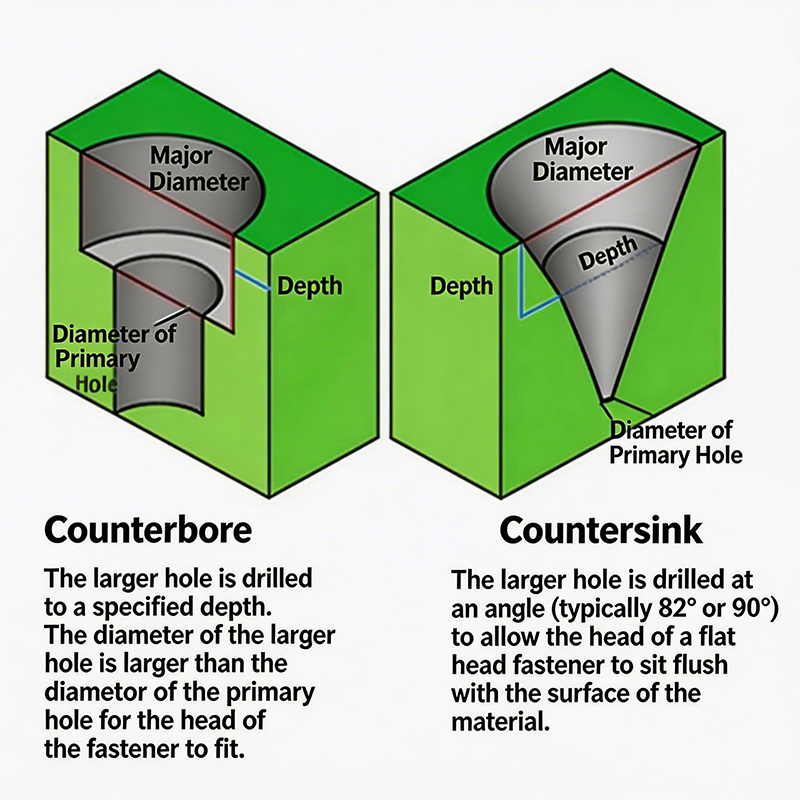
Countersink holes require more precision. The angle must match your screw exactly—common angles are 82° and 90°, though 60°, 100°, 110°, and 120° are also available .
The drilling process involves:
Drilling the pilot hole first
Using a countersink bit at the correct angle
Controlling depth carefully so the screw head sits flush but not too deep
Because countersinking requires angled drilling and precise depth control, it's more complex and takes more time than counterboring .
Counterbore holes are simpler to drill:
Drill the pilot hole
Use a counterbore bit (larger diameter) to drill the recess to the correct depth
Straight down, no angles to worry about. Just match the diameters to your screw head and body dimensions, and control the depth so the screw head sits where you want it .
Here's a practical tip from experienced PCB manufacturers: most will prefer counterbores over countersinks when possible .
Why? Because countersinking requires angled drilling and extra steps, which add time and carry more risk of damaging the board. Counterbores are straightforward—drill straight, control depth, done.
That said, if your design needs countersinks, good manufacturers can handle them. Just be aware that they may cost a bit more and take slightly longer.
When you're sitting down to design your PCB, ask yourself these questions:
How much space do I have inside the enclosure? If space is tight, countersinks help you save every millimeter.
Does the surface need to be perfectly smooth? For external surfaces or applications where screws might snag on something, countersinks are your friend.
What kind of loads will these screws handle? Heavy loads point toward counterbores for maximum strength.
What screw types am I using? Flat-head screws need countersinks. Socket head or hex bolts need counterbores.
Is this an internal or external layer? Countersinks work well on external layers where smoothness matters. Counterbores are great for internal layers where strength is key .
What does my manufacturer recommend? Always worth asking early—they may have practical advice based on their equipment and experience.
Countersink and counterbore holes both serve the same basic purpose: letting screw heads sit below the board surface. But they're shaped differently, work with different screw types, and shine in different applications.
Countersinks give you a smooth, flush surface—perfect for tight spaces, good looks, and applications where nothing can protrude. They work with flat-head screws and come in various angles.
Counterbores give you maximum strength—perfect for heavy loads, socket head screws, and situations where holding power matters more than surface smoothness. They're simpler to drill and preserve more board material.
Choose based on what matters most for your specific project. And when in doubt, talk to your PCB manufacturer early—they've seen thousands of designs and can guide you toward the right choice.

Kaboer manufacturing PCBs since 2009. Professional technology and high-precision Printed Circuit Boards involved in Medical, IOT, UAV, Aviation, Automotive, Aerospace, Industrial Control, Artificial Intelligence, Consumer Electronics etc..


 English



 Wechat
 +86 13670210335
 +86 13670210335
 E-mail