
Date: 2026-03-28
If you've ever looked at a circuit diagram and seen two lines that shouldn't connect, connected by a blob of solder in your mind, you've thought about a diagram short circuit. But on a schematic, a short circuit isn't usually drawn as a mistake—it's drawn deliberately, with a specific symbol, to tell you something important.
Here's the thing about shorts: they're the most common failure in electronics. Two points that should be separate, connected by a path of low resistance. In a finished board, that's a problem. In a diagram, it's a warning.
Let's talk about how short circuits appear on schematics, why they're shown that way, and what you need to know to keep them from showing up in your actual boards.
A short circuit is an unintended connection between two points that should be separate. In a circuit diagram, a short isn't usually drawn as an error. It's shown as a simple connection—a wire linking two nets that normally wouldn't be connected.
But here's the catch: schematics don't always make shorts obvious. Sometimes a short is created by a component that's supposed to be there, like a jumper or a zero-ohm resistor. Sometimes it's created by a design choice, like connecting multiple ground points together. And sometimes it's a mistake—two nets that should be separate, accidentally connected by a missing junction or a misrouted wire.
The diagram itself is neutral. It just shows what the designer intended. The problem is when what's intended is wrong, or when the physical board doesn't match what the diagram says.
In a schematic, a short circuit is simply a connection. There's no special symbol that screams "SHORT!"—it's just a wire or a trace connecting two points.
But there are a few ways designers intentionally create or indicate shorts:
Direct wire connection. The simplest. Two nets are connected by a line on the diagram. That's intentional. If they shouldn't be connected, it's a design error.
Zero-ohm resistor. A component that looks like a resistor but has zero resistance. It's used as a jumper. On the diagram, it looks like a resistor symbol with "0Ω" or "000" next to it. Functionally, it's a short circuit—but it's a deliberate one.
Jumper wire. Sometimes shown as a dotted line or a wire that physically bypasses a section of the circuit. Used for configuration options or test points.
Multiple grounds. In many designs, different ground nets (analog ground, digital ground, power ground) are kept separate on the diagram and only connected at one point—often through a ferrite bead or a zero-ohm resistor. That single connection is a short circuit by design.
Test points. A pad or via that's accessible for probing. If two test points are shorted together on the board, that's a problem—but on the diagram, they're just two separate points.
Even experienced engineers make these mistakes. Here's what to watch for:
Missing junctions. In schematic software, if two wires cross but don't have a dot at the intersection, they're not connected. But if you place a component pin on a wire without a dot, sometimes it connects; sometimes it doesn't. The result can be an unintended open or short.
Net name collisions. If you accidentally use the same net name on two different nets, your software will connect them. That's often a short circuit you didn't intend.
Accidental connections under components. When you place a component symbol, its pins have hidden connections. If you drag a symbol over an existing wire, the wire might connect to a pin without you realizing it.
Power and ground plane shorts. In the schematic, power and ground are just symbols. But when you transfer to PCB layout, power and ground planes can short if you're not careful—especially if you have multiple voltage rails with similar names (3.3V and 3.3V_A, for example).
Forgotten series resistors. A resistor that should be there but isn't can create a short. If you omit a current-limiting resistor for an LED, you've created a short from power to ground through the LED—which will burn it out.
A schematic is the plan. The PCB is the reality. And what looks fine on paper can become a short circuit on the board.
Solder bridges. Two pads that should be separate get connected by a blob of solder. This is the most common manufacturing short.
Copper pour mistakes. If your ground pour gets too close to a power trace, the clearance might be too small. The fab might bridge them, or they might short under vibration.
Via placement. A via placed too close to a pad can create a short. Especially if the via is on a different net.
Component placement. A component placed too close to another can short. Tall components that bend over and touch are a classic problem.
Damaged solder mask. If the mask scratches off, copper can be exposed where it shouldn't be.
Internal layer shorts. The worst kind. Two inner layers short together inside the board. You can't see it, and you can't fix it. The board is scrap.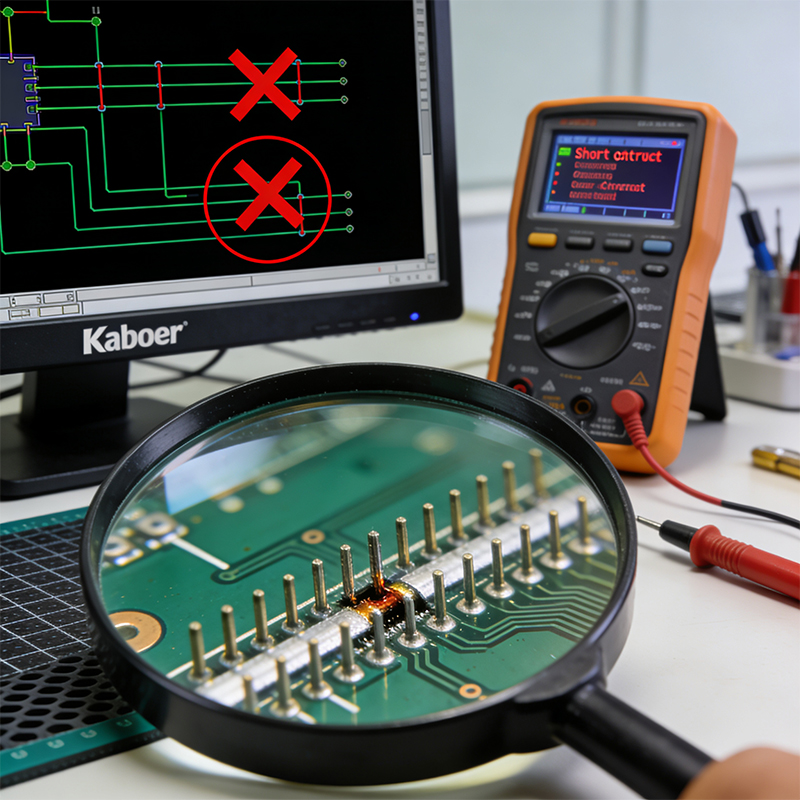
The best short circuit is the one that never makes it to the board. Here's how to catch them:
Design Rule Checks (DRC). Your PCB software has tools that check for clearance violations, overlapping nets, and missing connections. Run them. Fix what they find.
Electrical Rule Checks (ERC). Checks for things DRC misses—like power pins connected incorrectly, or outputs connected to outputs.
Netlist comparison. Before you send files, compare the netlist from your schematic to the netlist from your layout. They should match. If they don't, you have a problem.
Online DFM tools. Many manufacturers offer free DFM checks. Upload your Gerbers, and they'll flag potential shorts, insufficient clearances, and other issues.
Visual inspection. Look at your board. Before you order, look at the layout. After you get boards, look at them under magnification. Many shorts are visible to the naked eye.
Electrical test. Every board should be tested for shorts and opens. This is non-negotiable. If your manufacturer doesn't offer electrical test, find another manufacturer.
Sometimes shorts slip through. When they do, here's how to find them:
Visual inspection. Start with your eyes. Look for solder bridges, stray copper, components touching.
Use a multimeter. Set it to continuity. Probe suspect nets. If it beeps when it shouldn't, you've found a short.
Split the circuit. If the short is on a big net—like power or ground—start cutting traces or removing components to isolate where the short is.
Thermal imaging. Power up the board and look for hot spots. The short will often be the hottest point.
Time domain reflectometry (TDR). Advanced technique. It sends a pulse down a trace and measures reflections. A short will cause a reflection that tells you how far away it is.
X-ray. For internal shorts or shorts under BGAs, X-ray is the only way to see what's going on.
At Kaboer, we've been building custom PCBs since 2009. Based in Shenzhen with our own PCBA factory, we know that shorts are the enemy. We build processes to keep them out.
What we do:
DFM review. Before we build, our engineers check your design for clearance violations, netlist consistency, and potential shorts.
Precision fabrication. Our etching, drilling, and plating processes are controlled to prevent manufacturing defects that cause shorts.
Automated Optical Inspection (AOI). Every board is scanned for visible defects—bridges, misalignments, missing traces.
X-ray inspection. For hidden joints under BGAs and QFNs, we look inside to catch shorts you can't see.
Electrical test. Every board. Every net. No exceptions.
We work across the full range—rigid, flexible, rigid-flex, HDI—and we apply the same rigorous testing to all of them.
If you're designing a board and want to make sure shorts don't make it to production—or if you're dealing with a short and need help finding it—send us your requirements or Gerber files. We'll review your design, give you honest feedback, and get back to you with a quote. We've been at this for over 15 years, and we believe the best partnerships start with straightforward conversations.
And if you're ever in Shenzhen, we'd be happy to show you around our factory and walk you through how we keep shorts out of your boards.

Kaboer manufacturing PCBs since 2009. Professional technology and high-precision Printed Circuit Boards involved in Medical, IOT, UAV, Aviation, Automotive, Aerospace, Industrial Control, Artificial Intelligence, Consumer Electronics etc..


 English



 Wechat
 +86 13670210335
 +86 13670210335
 E-mail