
Date: 2026-07-03
You've definitely seen them before. That thin yellow ribbon cable connecting your phone's screen to its motherboard. The flex cable bending through your laptop's hinge. At the end of those cables, there's usually a small socket with a tiny locking flap. That socket is called a ZIF connector.
ZIF stands for Zero Insertion Force. It's not the kind of connector you have to push hard to insert — you slide the cable in with almost no force, then flip down a small latch to lock it in place.
In this guide, I'll explain what a ZIF connector is, how it differs from regular connectors, what types and specs exist, and where it's used. Plain English, no fluff.
A ZIF connector is simply a connector that lets you insert a flexible cable with almost no force, then locks it securely in place.
It has two main parts: the housing and the actuator. The actuator is the little flap you flip open or slide out.
Using it takes three steps: open the actuator → slide the cable in → close the actuator. When you close it, the actuator applies even pressure across all contacts, pressing the cable against the connector terminals.
No tools required — you can do it with your fingertip. That's where the name comes from: zero force is needed to insert the cable.
Before ZIF, flex cables were connected using friction connectors — they relied on friction to "grip" the cable. This approach had several problems:
Hard to insert and remove: Every insertion required force, and the cable end could easily tear.
Wear and tear: Repeated insertion wore down the cable contacts and even caused micro-cracks in the copper traces.
Unstable contact: Friction connectors could loosen under vibration or thermal cycling, causing signal dropouts.
ZIF replaced "hard push" with "soft insert" — no resistance going in, and rock-solid once locked. That's why ZIF is standard in smartphones, wearables, automotive electronics — anywhere reliability is critical.
ZIF connectors are everywhere:
Smartphones and Tablets: Connecting displays, cameras, sensors, and batteries to motherboards — almost every flex cable socket inside a phone is ZIF.
Laptops: Display cables passing through the hinge.
Wearable Devices: Smartwatches, TWS earbuds — space is extremely tight, and ZIF is the only choice.
Automotive Electronics: Infotainment systems, touchscreens, sensors — ZIF's locking mechanism is far more reliable than friction connectors in high-vibration environments.
Medical Devices: Patient monitors, portable diagnostic equipment — requiring repeated connections and high reliability.
Test and Development Equipment: Scenarios where cables need to be plugged and unplugged frequently — ZIF reduces wear and extends life.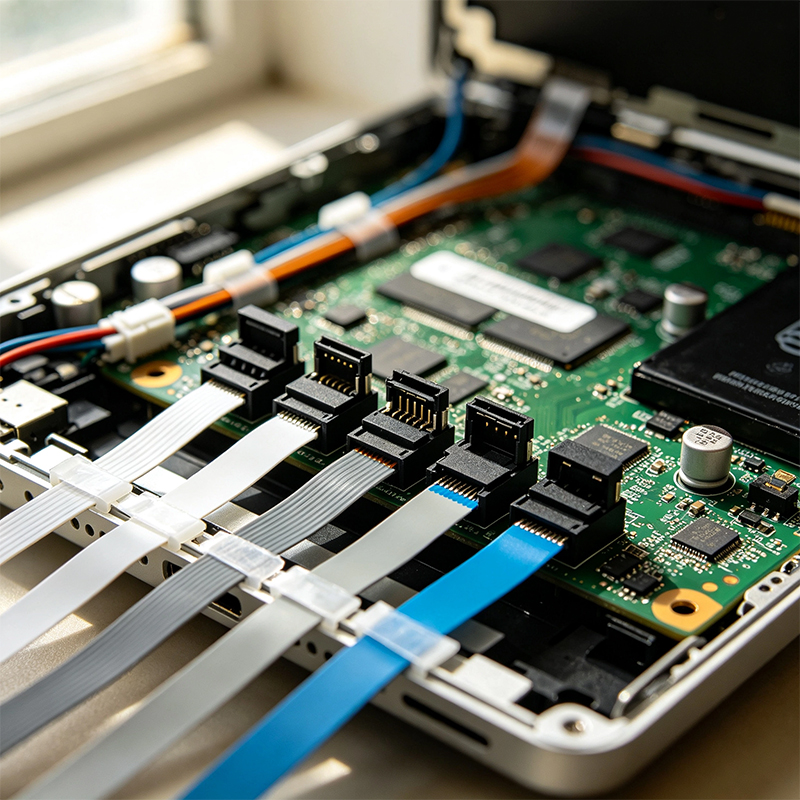
Three main parameters:
1. Pitch
The distance from the center of one contact to the next. Common pitches are 0.3mm, 0.5mm, and 1.0mm. 0.5mm dominates consumer electronics. 0.3mm is used in smartphones and wearables. 1.0mm is common where higher current is needed.
2. Pin Count
ZIF connectors range from 4 to 60 pins, with high-density versions going up to 80 pins or more.
3. Actuator Type
ZIF connectors come with different latch styles:
Flip-Lock / Hinge: The most common type. Flip it open, insert the cable, close it to lock.
Slider: Pull out a slide, insert the cable, push the slide back.
Back Flip: Opens from the back — one-handed operation.
LIF (Low Insertion Force): Slight resistance during insertion, secured by friction. No locking mechanism — simpler and cheaper. Best for static applications that don't require frequent reconnection.
Non-ZIF: Relies purely on friction contact. No lock. Used in permanent or semi-permanent assemblies, common in display modules and camera units.
Simply put: ZIF is the most reliable, best for repeated connections and high vibration; LIF and Non-ZIF are cheaper, better for one-time assembly or static applications.
If you're designing a product with flex cables and ZIF connectors, here are some common pitfalls:
1. Cable thickness must match
ZIF connectors have strict thickness requirements — typically 0.3mm ±0.03mm. Too thick, and it won't fit. Too thin, and it won't lock securely.
2. Stiffeners are essential
The end of a flexible cable usually needs a polyimide stiffener — a thin rigid layer that makes the end stiff enough to insert and lock. Without it, the cable is too floppy.
3. Actuator direction matters
ZIF connectors come in Top Contact and Bottom Contact versions. The cable's contacts must be on the correct side. Wrong version = dead cables.
4. Soldering temperature control
ZIF connectors are typically surface-mount (SMT). Excessive heat can melt the plastic housing or actuator. Reflow profiles must be precise.
5. Choose Flip-Lock for frequent reconnections
If your product requires frequent cable insertion and removal (test equipment, development boards), Flip-Lock is more durable than Slider and easier to operate.
The global ZIF connector market is growing steadily. Valued at approximately $2.2 billion in 2025**, it's projected to reach **$4.01 billion by 2034 at a CAGR of 6.8%. Other reports project growth from $1.5 billion in 2024 to $3.3 billion by 2033 at a CAGR of 9.1%.
Consumer electronics, automotive, wearables, and medical devices are the key growth drivers.
A ZIF (Zero Insertion Force) connector is a connector that lets you insert a flexible cable with almost no force, then locks it securely in place.
It has a housing and an actuator (flip or slide). Insertion takes almost zero force, and the lock holds it firmly. Common pitches are 0.3mm, 0.5mm, and 1.0mm, with pin counts ranging from 4 to 60+. Smartphones, laptops, automotive, medical — almost everything that connects a flex cable uses ZIF.
If you're designing a product with flex cable connections, ZIF connector selection directly affects reliability and assembly efficiency. Wrong pitch, wrong actuator direction, mismatched cable thickness — any one of these details can scrap an entire batch of boards.

Kaboer manufacturing PCBs since 2009. Professional technology and high-precision Printed Circuit Boards involved in Medical, IOT, UAV, Aviation, Automotive, Aerospace, Industrial Control, Artificial Intelligence, Consumer Electronics etc..


 English


 Wechat
 +86 13670210335
 +86 13670210335
 E-mail