
Date: 2026-04-20
Have you ever squinted at a green circuit board and noticed all those tiny white letters, numbers, and symbols scattered around the components? You’ll see things like "R12," "C5," or a little logo near the corner.
That layer of ink is called silkscreen (or sometimes the "legend"). If the copper traces are the "roads" and the components are the "buildings," then the silkscreen is the set of street signs that keeps everyone from getting lost.
In technical terms, the silkscreen is a layer of non-conductive epoxy ink applied to the PCB. While white is the industry favorite because it pops against the standard green solder mask, you can actually get it in yellow, black, red, or even blue.
Its main job is to provide information. It tells humans (and machines) where things go, which way they should face, and what the board is actually called. Without it, a PCB is just a mysterious maze of copper and fiberglass.
You might think, "Hey, my Pick-and-Place machine has the data, why do I need ink?" Well, let’s talk real-world scenarios:
Troubleshooting: When your prototype doesn't turn on and you need to probe a resistor with a multimeter, you’ll be thanking your lucky stars that "R1" is clearly labeled.
Assembly Safety: It marks polarities. Trust me, you don't want to find out you soldered a capacitor backward because there was no "+" sign on the board.
Branding & Certifications: This is where you put your company logo, the version number (e.g., V2.1), and those mandatory regulatory marks like CE or FCC.
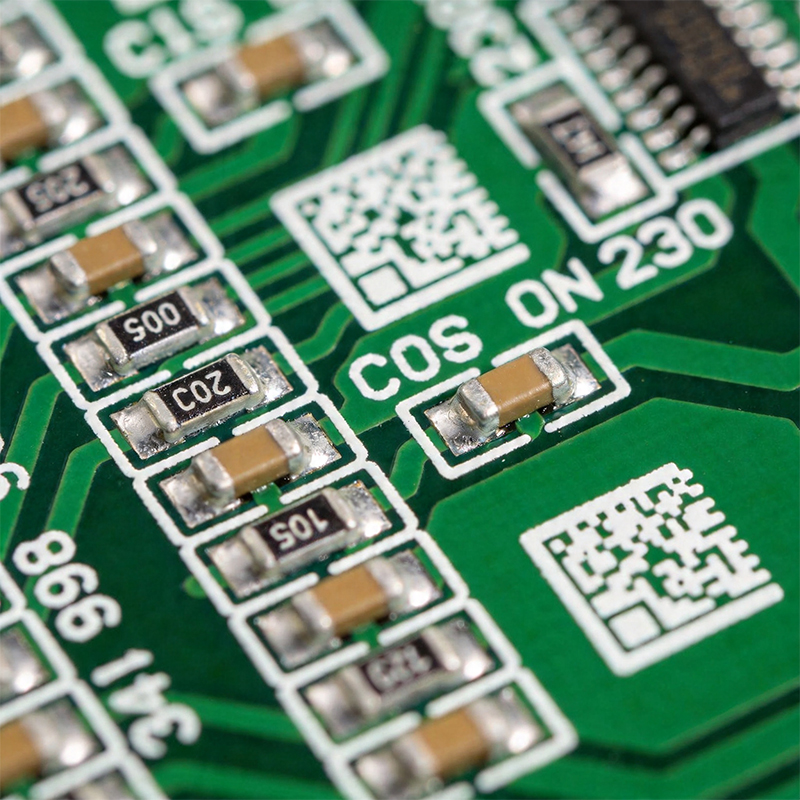
There are three main ways factories put that ink on your board. In 2026, the technology has gotten incredibly precise:
Manual Screen Printing: The classic way. A stencil is used to "squeegee" ink onto the board. It’s cheap but not great for tiny text.
Liquid Photo Imaging (LPI): Similar to the solder mask process. It’s more accurate than manual printing but involves a lot of steps.
Direct Legend Printing (DLP): This is essentially a high-end inkjet printer for PCBs. It’s the "gold standard" for 2026. It’s fast, incredibly sharp, and can handle tiny 0201 component labels without breaking a sweat.
If you want your manufacturer to love you, follow these "pro tips":
Don't Print on Pads: This is the #1 mistake. If ink gets on a solder pad, the component won't stick properly. Most factory software will automatically clip this, but it’s better to design it right from the start.
Watch the Font Size: Anything smaller than 0.5mm height usually turns into a blurry blob. Keep it readable!
Orientation Matters: Try to keep all your text facing the same one or two directions. No one likes rotating a board 360 degrees just to read the labels.
While white on green is the "classic" look, modern aesthetics are changing things up. Many high-end audio or gaming components use black solder mask with white or gold silkscreen for that "premium" feel. Just remember: contrast is king. If you use black ink on a black board, you’re basically making a "stealth" PCB that no one can fix!
At the end of the day, silkscreen is about communication. It’s the final bridge between your digital design and the physical world. Whether you’re a hobbyist or a massive manufacturer, getting your silkscreen right makes your product look professional and makes maintenance a breeze.

Kaboer manufacturing PCBs since 2009. Professional technology and high-precision Printed Circuit Boards involved in Medical, IOT, UAV, Aviation, Automotive, Aerospace, Industrial Control, Artificial Intelligence, Consumer Electronics etc..


 English



 Wechat
 +86 13670210335
 +86 13670210335
 E-mail