
Date: 2026-01-17
When a circuit board stops working, your first thought might be "Should I fix it or replace it?" In electronics manufacturing, the answer to this question often affects cost control and production efficiency. Today, let's talk about how to professionally repair circuit boards—not simple replacement, but real diagnosis and repair.
Before picking up tools, ask yourself:
Value of the faulty board: Is repair cost lower than replacement cost?
Severity of failure: Single component failure or multiple faults?
Time urgency: Time available for repair or need immediate replacement?
Future reliability: Can repaired board meet original reliability standards?
High-value boards: Server motherboards, industrial controllers, medical equipment core boards
Hard-to-replace boards: Custom designs, discontinued models
Sample boards from batch failures: Representative boards for root cause analysis
Extensive physical damage: Broken boards, internal layer damage in multilayer boards
Severe corrosion or burn damage: Large area damage involving multiple regions
Excessive repair cost: Estimated repair exceeds 60% of new board cost
Quality soldering equipment
Temperature-controlled soldering iron (recommended 60-80W, adjustable temperature)
Hot air rework station (for desoldering multi-pin components)
Solder sucker or desoldering braid
Measurement instruments
Digital multimeter (with capacitance, diode testing functions)
Optional: Oscilloscope (for signal analysis)
Magnification equipment
Magnifying glass or stereo microscope (at least 10x magnification)
Good lighting (LED strips or ring lights)
Chemicals
No-clean flux
Isopropyl alcohol (for cleaning)
Anti-static brushes
In-circuit tester (ICT)
X-ray inspection equipment
Thermal imaging camera
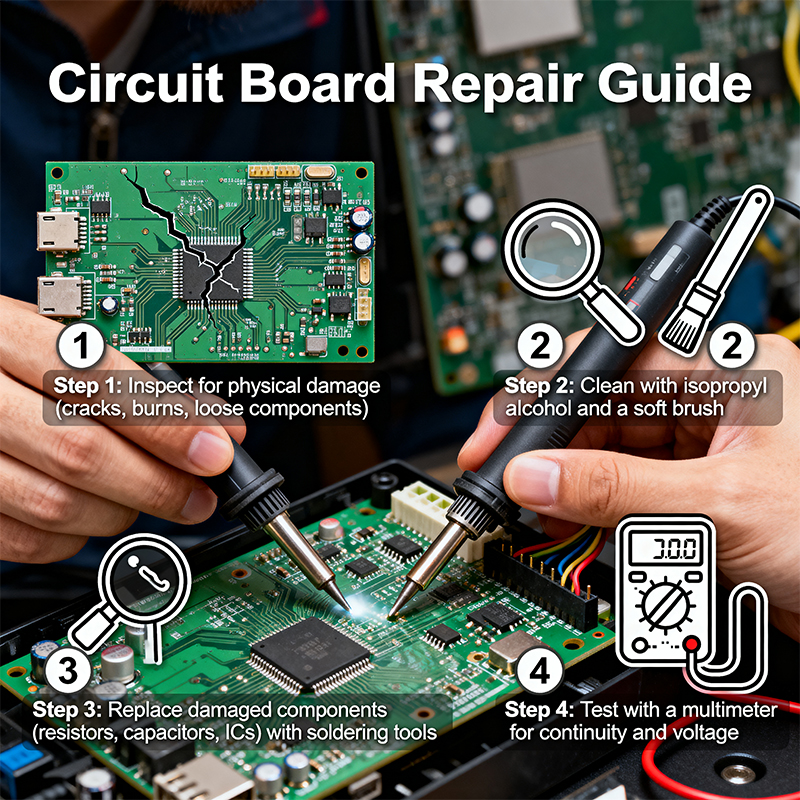
Before powering up, examine carefully under magnification:
Physical damage: Cracks, bends, broken traces
Component abnormalities: Bulging capacitors, burnt resistors, cracked chips
Solder issues: Cold joints, bridges, poor connections
Corrosion signs: Especially around connectors and moisture-sensitive areas
Previous repair marks: Check if previous repairs were professional
Practical tip: Shine a flashlight at different angles across the board; shadows highlight uneven surfaces and tiny cracks.
Many faults are caused by contaminants:
Gently remove dust with a soft brush
Clean suspicious areas with isopropyl alcohol and cotton swabs
For stubborn stains, consider ultrasonic cleaning (risk of damaging some components)
Safely conduct:
Power short test: Check for shorts between power and ground with multimeter
Key point resistance: Measure resistance to ground at key test points, compare with good board
In-circuit component testing: Test diodes, transistors, etc., without removing them
Safety warning: Ensure board is completely powered down and discharged (especially large capacitors) before testing.
Start with most likely problem areas:
Check all voltage regulator outputs
Measure supply pin voltages on major chips
Check power ripple and stability
Confirm main clock signal exists with correct frequency
Check reset signal is normal
Trace key signals (data lines, address lines)
Check interface connectors
Desoldering techniques:
For multi-pin ICs, use hot air with appropriate nozzle
Apply heat evenly to avoid localized overheating
Use flux to aid solder melting
Soldering new components:
Clean pads, ensure no solder residue
Align polarity (reference silkscreen markings)
Use appropriate temperature and duration
Scrape off solder mask at both ends of broken trace to expose copper
Tin the exposed areas for good connection
Connect with fine wire (like enameled wire)
Secure and protect with UV-curing adhesive or solder mask
If pad is completely gone, find where the trace connects
Use fine wire to connect directly to component lead
Secure wire with adhesive for mechanical strength
Clean clogged vias with needle or fine drill bit
Solder from both sides to ensure connection
If necessary, use wire through the via to connect both sides
Repair isn't complete without verification:
Visual check: Confirm repaired areas look proper
Electrical testing: Repeat previous tests, ensure problem resolved
Functional testing: Full functional test if possible
Reliability check: Lightly tap board, wiggle connections to ensure repair is secure
Symptoms: Complete power failure, specific voltage missing, unstable voltage
Common causes: Blown fuse, damaged regulator chip, failed filter capacitor
Repair: Replace damaged components, check loads for shorts
Symptoms: Partial function failure, random crashes, specific operations failing
Common causes: Logic chip damage, corrupted firmware, clock issues
Repair: Replace suspect chips, reprogram firmware, check clock circuits
Symptoms: Signal distortion, excessive noise, abnormal gain
Common causes: Damaged op-amps, reference voltage drift, passive component degradation
Repair: Replace op-amps, check reference voltage sources, measure key point voltages
Symptoms: Visible cracks, breaks, bending
Common causes: Mechanical stress, thermal cycling, improper handling
Repair: Wire jumpers, epoxy reinforcement, structural support
Symptoms: Green or white powder, poor connections, leakage
Common causes: Moisture, contaminants, electrolytic corrosion
Repair: Thorough cleaning, replace affected components, apply protective coating
BGA (Ball Grid Array) chip repair requires more skill:
Precise heating: Use preheater and hot air station with controlled temperature profile
Alignment techniques: Use magnification and alignment marks
Solder ball repair: For missing or damaged balls, reballing may be needed
When faults are in internal layers:
Locate fault through testing
Carefully drill to fault layer (avoid damaging other layers)
Connect using micro-wires
Fill hole with epoxy resin to restore insulation
Flex boards need special handling:
Use low-temperature solder to reduce thermal stress
Special flex board adhesives
Add mechanical support after repair
Basic function verification
Continuous operation test (at least 24 hours)
Temperature cycling test (if applicable)
Does repaired area withstand mechanical stress?
Are materials used compatible?
Does repair introduce new failure points?
Whether repair is successful or not, document:
Fault symptoms
Root cause found
Repair actions taken
Test results
Any remaining risks
These records are valuable for preventing future faults and improving designs.
Use anti-static wrist straps and mats
Ensure good ventilation to avoid inhaling solder fumes
Wear safety glasses to prevent solder splashes
Wear gloves when handling old boards that may contain hazardous materials
Confirm test equipment settings to avoid overload
Be aware of high-voltage areas on boards
Use appropriate precautions when repairing sensitive circuits
While many repairs can be done yourself, consider professional service when:
High-precision instrument calibration is involved
Expensive specialized equipment is needed
Safety-critical systems are involved (medical, automotive, aerospace)
High-risk repairs with no relevant experience
Every faulty circuit board is a learning opportunity. Through repair, you can:
Understand design weaknesses to improve next-generation products
Identify quality issues in supply chain
Train technicians to improve skills
Build repair database to predict and prevent common faults
Effective repair capability is a significant competitive advantage for electronics manufacturers. It not only reduces production costs but also improves customer satisfaction and provides valuable firsthand information for product improvement.
Remember, the best repair is preventive design. After each repair, ask yourself: "Could this fault have been prevented through design improvement?" This way, repair becomes part of continuous improvement, not just fixing.

Kaboer manufacturing PCBs since 2009. Professional technology and high-precision Printed Circuit Boards involved in Medical, IOT, UAV, Aviation, Automotive, Aerospace, Industrial Control, Artificial Intelligence, Consumer Electronics etc..


 English



 Wechat
 +86 13670210335
 +86 13670210335
 E-mail