
Date: 2026-01-17
You may never have paid much attention to those small white letters and symbols on circuit boards—until the day your assembly worker holds up a board and asks, "Which way does this diode go?" Or a repair technician complains, "I can't find the test points anywhere." These seemingly insignificant white markings are the PCB silkscreen, and they play a much more important role in electronics manufacturing and use than you might think.
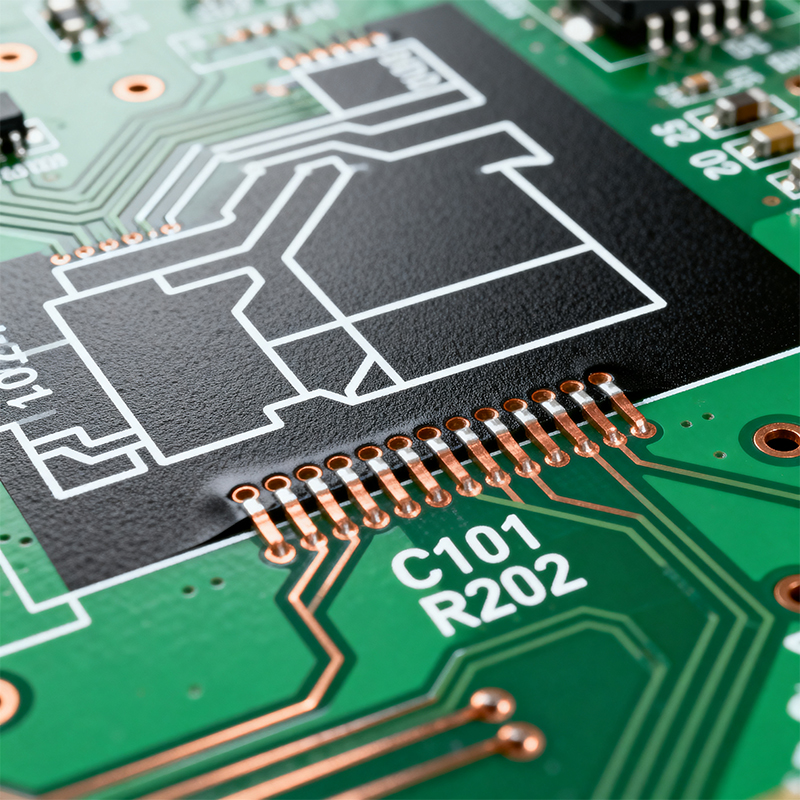
Simply put, PCB silkscreen is the text, numbers, and symbols printed on the surface of a circuit board. It usually appears white but can also be yellow, black, or other colors. Think of it as the circuit board's "instruction manual"—telling people what's on the board and how to use it.
Imagine if there were no silkscreen:
Assembly workers wouldn't know where components go
Repair technicians couldn't find points to test
You couldn't even tell which product version the board is for
That's why even the simplest circuit boards almost always have a silkscreen layer.
This is the silkscreen's most basic and crucial function:
Reference designators: Like R1 (first resistor), C5 (fifth capacitor), U3 (third integrated circuit). It's like giving each component a name tag.
Polarity markings: For components with positive and negative ends, the silkscreen clearly indicates which is which. A line next to a diode, a "+" next to an electrolytic capacitor—these are common polarity markers.
Orientation indicators: Some components must be installed in a specific direction. The small dot or notch on an IC chip, arrows next to connectors—all show the correct installation orientation.
Product model and name
Version or revision codes (especially when designs have been modified)
Manufacturer information
Production date or lot numbers
Test point labels (like "TP1," "GND test point")
Jumper setting instructions (like "JP1: 1-2 normal, 2-3 test")
Interface identification (like "Power input," "USB port")
Safety warnings (like high-voltage area alerts)
Like printing T-shirts, this is the most common and economical method:
Create a screen with the pattern (areas to be printed are open)
Align the screen to the circuit board
Squeeze ink across the screen; ink passes through open areas onto the board
Heat-cure the ink
This method works for most applications but may not be clear enough for very small text or complex patterns.
This method is more precise, similar to how solder mask is made:
Coat the entire board with photosensitive ink
Expose to UV light to cure areas where silkscreen should remain
Wash away uncured ink
Heat-cure
This method produces finer patterns with higher resolution but at higher cost.
The newest technology, similar to an office printer:
No screens needed; prints directly from computer files
Particularly good for small batches and quick prototypes
Easily prints variable information (like unique serial numbers for each board)
Size matters
Characters too small may blur together after printing; too large wastes space. Typically recommended:
Minimum character height: 1.0mm or more
Minimum line width: 0.15mm or more
Color contrast must be strong
White silkscreen shows up best on green solder mask because of the strong contrast. But if your board has black solder mask, white silkscreen still works, though yellow might be clearer. White solder mask needs black silkscreen.
Avoid printing where it shouldn't go
Silkscreen must never be printed on:
Pads (affects soldering)
Gold fingers or contact areas
Areas requiring heat dissipation
Places that will be completely covered by large components
Close but not touching
Component identifiers should be near their corresponding components but with enough distance to ensure:
They won't be covered by the component itself
They remain visible after assembly
They're easy to find during repair
Consistent orientation
All text should preferably face the same direction (horizontal or vertical), avoiding situations where workers need to constantly rotate the board to read.
Highlight critical information
Polarity marks, orientation indicators, test points—these critical pieces of information can be emphasized with larger size or special symbols.
Usually caused by:
Characters designed too small
Ink too thin or too thick
Incorrect printing parameters
Solution: Adjust designs to match manufacturer's capabilities; work with manufacturer to optimize printing parameters.
Possible causes:
Silkscreen layer not properly aligned with other layers in design files
Registration errors during printing
Board warpage during processing
Solution: Ensure precise layer alignment during design; choose manufacturers with strong process capabilities.
White silkscreen in particular may yellow after reflow soldering heat. If this affects readability:
Consider using high-temperature specialized inks
Switch to other silkscreen colors
Avoid placing important information near heat-dissipating components
When boards are densely packed with components, there may not be enough space for complete silkscreen. In such cases:
Label only the most critical information (polarity, orientation)
Use abbreviations or codes
Move some information to less crowded board areas
Flexible board surfaces may be uneven, presenting greater challenges:
Special inks may be needed for proper adhesion
Character designs should be simpler
Consider laser marking as an alternative
If products are sold in different countries, sometimes multi-language labeling is needed:
Ensure sufficient space
Consider using internationally understood symbols instead of words
Or produce different versions for different markets
As components keep shrinking, silkscreen characters need to shrink too. This demands more from manufacturing processes.
Silkscreen needs to be readable by machines as well as people:
QR codes storing more information
Special markings helping Automated Optical Inspection systems with positioning
Machine-readable characters and symbols
Environmental requirements are pushing inks toward halogen-free, low-VOC formulations.
Think one step ahead during design: Imagine how assembly workers, test engineers, and repair technicians will use the silkscreen information.
Communicate with manufacturers early: Understand their process capabilities—know what's possible and what's difficult.
Verify with physical samples: After receiving the first boards, check silkscreen clarity and usefulness in actual working conditions.
Continuously optimize: Keep improving silkscreen designs based on real-world feedback.
PCB silkscreen is far more than decoration—it's a crucial communication bridge between the circuit board and its users. Good silkscreen design significantly improves production efficiency, reduces errors, and facilitates repairs; poor silkscreen can cause ongoing problems.
Investing time in designing clear, practical silkscreen pays continuous returns throughout a product's lifecycle. After all, when people can easily understand a circuit board, all related work becomes smoother and more efficient.

Kaboer manufacturing PCBs since 2009. Professional technology and high-precision Printed Circuit Boards involved in Medical, IOT, UAV, Aviation, Automotive, Aerospace, Industrial Control, Artificial Intelligence, Consumer Electronics etc..


 English



 Wechat
 +86 13670210335
 +86 13670210335
 E-mail