
Date: 2026-02-05
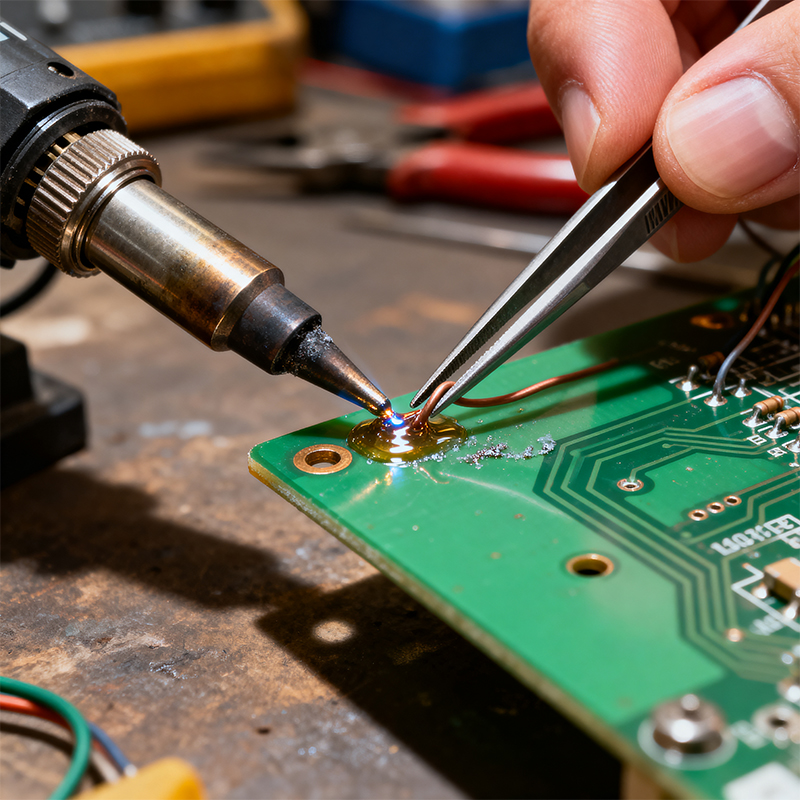
Soldering wire to a PCB board is like using a special "metal glue" to permanently join two metal parts together. This "glue" is what we call solder, which melts at high temperature and solidifies upon cooling, forming a strong electrical and mechanical connection. The core of soldering is precise heat transfer—you need to deliver enough heat simultaneously to the metal part of the wire and the pad on the PCB board, allowing the solder to flow evenly and envelop both, creating a shiny, strong solder joint.
A perfect solder joint should look like a small, smooth volcanic crater—shiny surface, solder evenly covering the connection, with no sharp spikes or gaps. Common beginner mistakes include "cold solder joints" (dull, rough joints resulting from insufficient heat) or damaging the circuit board from overheating.
Preparing appropriate tools before soldering is as important as a chef preparing kitchen utensils. Here are the essentials for your "soldering toolkit":
Core Tools:
Soldering iron: A temperature-controlled iron is recommended, set between 300°C and 350°C. A temperature-regulated iron provides more consistent performance.
Solder wire: Choose solder wire with rosin core, approximately 0.8mm-1.0mm in diameter. For general electronics work, either 60/40 (tin/lead ratio) or lead-free solder works fine.
Supporting tools: Include tweezers, wire strippers, wire cutters, soldering iron stand, and cleaning sponge.
Safety Equipment:
Safety glasses: Protect your eyes from splashing molten solder.
Ventilation equipment or work in a well-ventilated area: Avoid inhaling solder fumes.
Anti-static wrist strap (optional but recommended): If you're soldering static-sensitive components.
PCB Board and Wire Preparation:
Ensure the PCB board pads are clean, free from oxidation or contamination.
Choose appropriate wire: Select proper wire gauge based on current requirements, and strip approximately 3-5mm of insulation using wire strippers, being careful not to damage the internal metal strands.
Clean the soldering surfaces: Gently clean PCB pads with isopropyl alcohol and cotton swabs to remove dust or grease.
Prepare the wire: Strip the wire end using wire strippers. If the wire is multi-stranded, twist the strands slightly or "tin" the bare wire (pre-coat with a thin layer of solder).
Preheat the soldering iron: Set the iron to appropriate temperature (typically around 320°C) and wait for it to fully heat up.
Secure the wire: Pass the prepared wire through appropriate holes in the PCB board (if through-hole soldering) or place it on surface pads. You can use helping hands or tape to temporarily secure the position.
Heat the connection: Touch the soldering iron tip to both the metal part of the wire and the PCB pad simultaneously. You need to maintain this contact for about 1-2 seconds, allowing both to reach proper temperature.
Pro tip: Imagine you're "massaging" both metal parts that need connecting with the iron tip, not just touching them.
Add solder: Gently touch the solder wire to the heated area (not directly to the iron tip), and the solder will melt and flow toward the connection due to the heat.
Key point: Once you see solder beginning to flow and cover the connection, immediately remove the solder wire, but keep the iron on the connection for another 0.5-1 second, allowing the solder to fully flow and form a good connection.
Complete the soldering: Remove the solder wire first, then remove the soldering iron, allowing the joint to cool naturally. Do not move the wire or PCB board during cooling, as this can cause internal cracks in the joint (what we call a "disturbed solder joint").
Inspect the solder joint: A good solder joint should:
Have a shiny, smooth surface (may be slightly duller with lead-free solder)
Have solder evenly covering the connection, forming a cone shape
Have no sharp spikes or gaps
Securely hold the wire in place
Possible causes: Surface contamination or oxidation.
Solutions: Thoroughly clean surfaces; ensure iron temperature is sufficient; "tin" wires before soldering; use flux to improve solder flow.
Possible causes: Insufficient heat or movement during cooling.
Solutions: Increase iron temperature or extend heating time; ensure wire remains completely still during cooling.
Possible causes: Uneven surface temperature or insufficient flux.
Solutions: Ensure iron tip makes good contact with both wire and pad; use rosin-core solder or add a small amount of additional flux.
Possible causes: Added too much solder.
Solutions: Practice controlling solder amount; if already too much, use desoldering braid or solder sucker to remove excess.
Possible causes: Incorrect iron removal technique or excessive soldering time.
Solutions: Remove iron smoothly and quickly; control soldering time to avoid overheating.
Multi-stranded wires are trickier than single-strand wires because the fine strands tend to fray. A practical technique is:
Gently twist the exposed multi-strand wires
"Tin" the exposed part before soldering
Trim any excess solder to keep the wire end neat
To add mechanical strength and insulation protection to the connection, you can slide a small piece of heat shrink tubing onto the wire before soldering. After soldering, slide the tubing over the connection and carefully heat it with a heat gun or soldering iron to make it shrink.
If you need to solder wires to surface mount pads (no through holes):
First add a small amount of solder to the pad
Place the wire end onto the solder
Reheat with the iron to embed the wire in the solder
Remove the iron, keeping the wire still until cooled
Besides visual inspection, also perform:
Mechanical strength test: Gently pull the wire to check if the joint is secure
Electrical continuity test: Use a multimeter to check connection quality
Insulation check: Ensure no short circuits to adjacent pads or traces
Avoid burns: Always keep the soldering iron in its stand; never touch the iron tip.
Good ventilation: Soldering produces potentially harmful fumes; ensure your workspace is well-ventilated.
Static protection: Use anti-static mats and wrist straps when handling sensitive components.
Eye protection: Always wear safety glasses to protect against solder splashes.
Misconception 1: Longer soldering time is better.
Fact: Overheating can damage PCB boards and components. Ideally, soldering should be completed within 2-4 seconds.
Misconception 2: Higher iron temperature is better.
Fact: Too high temperature can cause pads to lift or components to damage; too low temperature causes cold joints. Find the "sweet spot" temperature for your work.
Misconception 3: Melt solder directly on the iron tip, then drip it onto the connection.
Fact: This causes cold solder joints. The correct method is to heat the connection point and let the heat from the connection melt the solder.
Misconception 4: Neglecting the role of flux.
Fact: Flux cleans metal surfaces and improves solder flow. Even with rosin-core solder, additional flux is sometimes needed.
Soldering is a skill that requires practice. Start by practicing on discarded PCB boards until you can consistently create shiny, strong solder joints. Every professional started as a beginner—the key is patience and consistent practice.
Remember, a good solder connection isn't just about looking pretty; more importantly, it provides reliable electrical connection and mechanical strength. Once you master this skill, you'll be able to perform circuit repairs, prototype creation, and various electronics projects, opening up endless possibilities in electronics manufacturing and repair.

Kaboer manufacturing PCBs since 2009. Professional technology and high-precision Printed Circuit Boards involved in Medical, IOT, UAV, Aviation, Automotive, Aerospace, Industrial Control, Artificial Intelligence, Consumer Electronics etc..


 English



 Wechat
 +86 13670210335
 +86 13670210335
 E-mail