
Date: 2026-07-17
You know that a computer has two of the most important things inside: the CPU and the motherboard. The CPU is the computer's "brain." The motherboard is the computer's "skeleton." But here's something you might not have thought about: the motherboard itself is a multi-layer circuit board — and that's exactly what we make.
In this guide, I'll explain three things together: what a CPU does, what a motherboard does, and how that motherboard is actually manufactured. Whether you're building your own PC or designing electronic products, you'll walk away with a much clearer picture.
The CPU (Central Processing Unit) is the computer's "brain." It's a fingernail-sized chip packed with billions of transistors that execute instructions, process data, and make decisions.
Every mouse click, every keystroke, every program you open — all of it becomes instructions that the CPU executes. Without a CPU, your computer is just a pile of metal and plastic.
The two main CPU brands are Intel and AMD — and they use completely different sockets.
A motherboard is the computer's "skeleton" plus "road network." It's a multi-layer circuit board with slots and connectors that connect the CPU, RAM, graphics card, storage, and power supply into one working system.
Key parts of a motherboard:
CPU Socket: Where the CPU plugs in — different CPUs need different sockets
RAM Slots: For memory modules
Chipset: The "traffic controller" that routes data between all components
PCIe Slots: For graphics cards, SSDs, and expansion cards
Storage Connectors: SATA and M.2 ports for drives
Power Connectors: For the power supply
The CPU is the "brain." The motherboard is the "skeleton + nervous system." The brain needs the skeleton to hold it in place and the nervous system to communicate with the rest of the body.
The CPU plugs directly into the CPU socket on the motherboard. From there, it communicates with RAM, the graphics card, storage drives, USB ports, and everything else through the copper traces embedded in the board.
The chipset on the motherboard manages all this data flow. Without the motherboard, the CPU is just a chip sitting there — it can't talk to anything.
Everything we've talked about so far — CPU sockets, RAM slots, PCIe slots, chipsets — they're all mounted on one thing: a multi-layer circuit board.
A modern motherboard is typically a 4-layer, 6-layer, or even 8+ layer board. It's not just a piece of green plastic — it's a carefully engineered stack of copper layers and insulating layers laminated together.
Signal layers: Carry data between the CPU, RAM, and graphics card
Ground layers: Provide a stable reference plane and reduce electromagnetic interference
Power layers: Distribute power to the CPU, RAM, PCIe slots, and other components
All of these layers are pressed together to form the board you see. After components are installed, every bit of data travels through the copper traces inside these layers.
The more layers a motherboard has, the better the signal quality and noise immunity. High-end motherboards use 6, 8, or even more layers to keep high-speed signals stable between the CPU, RAM, and graphics card.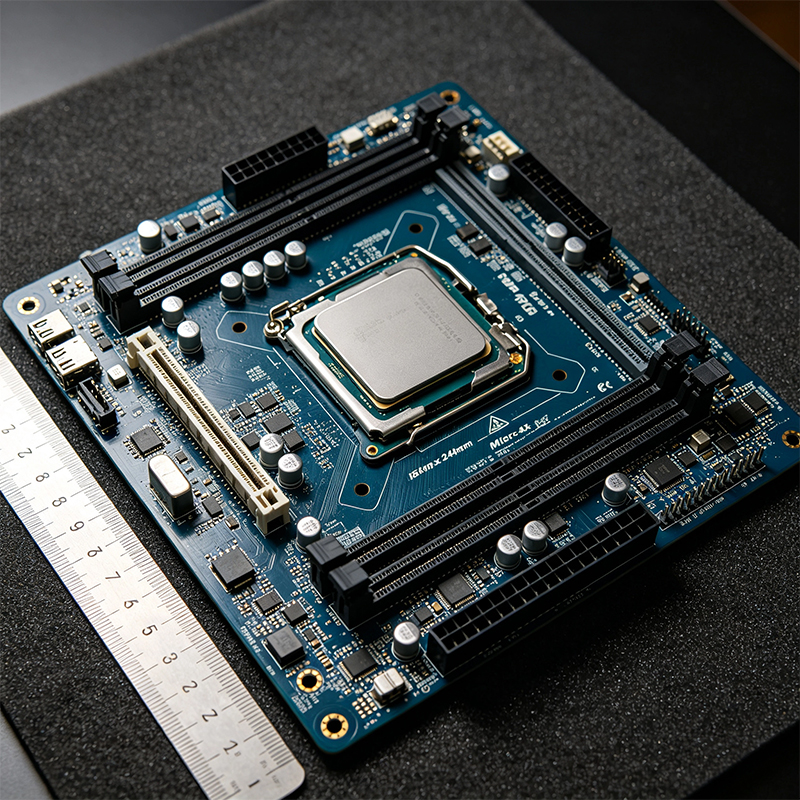
| Use Case | CPU Choice | Motherboard Choice | Typical Layers |
|---|---|---|---|
| Office / browsing | Intel i3 / AMD R3 | Entry-level B or H series | 4-layer |
| Gaming | Intel i5 / AMD R5 | Mid-range B or Z series | 6-layer |
| Content creation | Intel i7/i9 / AMD R7/R9 | High-end Z or X series | 8-layer |
| Extreme overclocking | Intel K / AMD X series | Flagship Z or X series | 8+ layers |
All those dense traces, vias, and pads on a motherboard aren't magic — they come from a precision manufacturing process. Here's how a motherboard is made:
Inner layer patterning: Circuit patterns are etched onto copper-clad boards
Lamination: Multiple copper and insulating layers are stacked and pressed into a solid board under high heat and pressure
Drilling: Holes are drilled for the CPU socket, RAM slots, and vias
Plating: Hole walls are plated with copper to connect layers
Outer layer patterning: Outer layer circuits are etched
Solder mask: The green protective coating is applied
Surface finish: Pads get ENIG (gold) or HASL (tin) for solderability
Testing: Every board is electrically tested
High-end motherboards (Z-series, X-series) use high-Tg FR4 material for better heat resistance and lower signal loss. The CPU power sections often use 2oz or even 3oz copper to handle high current without overheating.
The CPU is the brain — it does the computing. The motherboard is the skeleton + road network — it connects everything together.
But don't forget: the motherboard itself is a multi-layer circuit board. Every trace, every via, every pad — it's all fabricated layer by layer, trace by trace.
The CPU determines how fast your computer can think
The motherboard determines whether that CPU can run stable, whether your RAM can run at full speed, and whether your graphics card can perform
The motherboard itself is a multi-layer PCB — more layers, better materials, and cleaner signals mean a more reliable system

Kaboer manufacturing PCBs since 2009. Professional technology and high-precision Printed Circuit Boards involved in Medical, IOT, UAV, Aviation, Automotive, Aerospace, Industrial Control, Artificial Intelligence, Consumer Electronics etc..


 English



 Wechat
 +86 13670210335
 +86 13670210335
 E-mail