
Date: 2026-07-06
You've definitely had this happen. A circuit board that's been used for years, covered in dust, sticky residue, or even mystery liquid. The device starts acting up—buttons don't respond, signals are flaky, or it just stops working. A lot of the time, the problem isn't a dead component—it's a dirty board.
Dust, oil, flux residue, oxides—these contaminants cause leakage, shorts, and poor contact. Regular cleaning extends device life, reduces failures, and improves reliability.
In this guide, I'll explain how to clean circuit boards, what to use, and what you should never do. Plain English, no fluff.
Contaminants come from several sources:
Flux residue: Sticky residue left after soldering. Flux is corrosive—over time, it eats away at pads and traces.
Dust and particles: Airborne dust settles on boards. When it absorbs moisture, it becomes conductive—causing leakage.
Oxides: Copper pads and leads oxidize in air, forming a non-conductive layer that interferes with soldering and contacts.
Oil and fingerprints: Handling boards with bare hands leaves skin oils that contaminate pads.
Corrosive liquids: Battery leaks, chemical sprays, sweat—all can corrode the board.
A dirty board leads to leakage, shorts, signal degradation, cracked solder joints, and intermittent failures. Cleaning isn't about looking good—it's about working properly.
Cleaning circuit boards doesn't require expensive equipment—basic tools get the job done:
Isopropyl alcohol (IPA) : The most common cleaning solvent—90%+ concentration is best
Soft brush: ESD-safe brush for sweeping away dust
Lint-free cloth or cotton swabs: For wiping pads and components
Distilled or deionized water: For ultrasonic cleaning—never tap water
Compressed air or hair dryer: For drying boards
Ultrasonic cleaner: For deep-cleaning heavily contaminated boards
Pencil eraser: For cleaning oxidation off gold fingers
If your board just has light dust or minor residue, these methods are enough.
Method 1: Dry Cleaning — Brush Off Dust
Use an ESD-safe brush to gently sweep away dust and particles. Be gentle—you don't want to knock off components. For hard‑to‑reach areas, use compressed air—but keep the pressure low so you don't blow components away.
Method 2: Wet Cleaning — Isopropyl Alcohol (IPA) Wipe
For flux residue, oil, and fingerprints, IPA is the most effective solvent.
Steps:
Power down the board completely—unplug power, remove batteries
Dip a lint-free cloth or cotton swab in IPA
Gently wipe the contaminated areas—don't scrub hard
Use fresh swabs for stubborn spots
Let the board air‑dry in a well‑ventilated area—IPA evaporates quickly, usually within minutes
IPA concentration should be 90% or higher. Lower concentrations contain too much water, which dries slowly and can cause shorts.
Important: IPA is for wiping, not soaking. Don't submerge the entire board in IPA. Prolonged exposure can damage certain plastic components or dissolve silkscreen markings.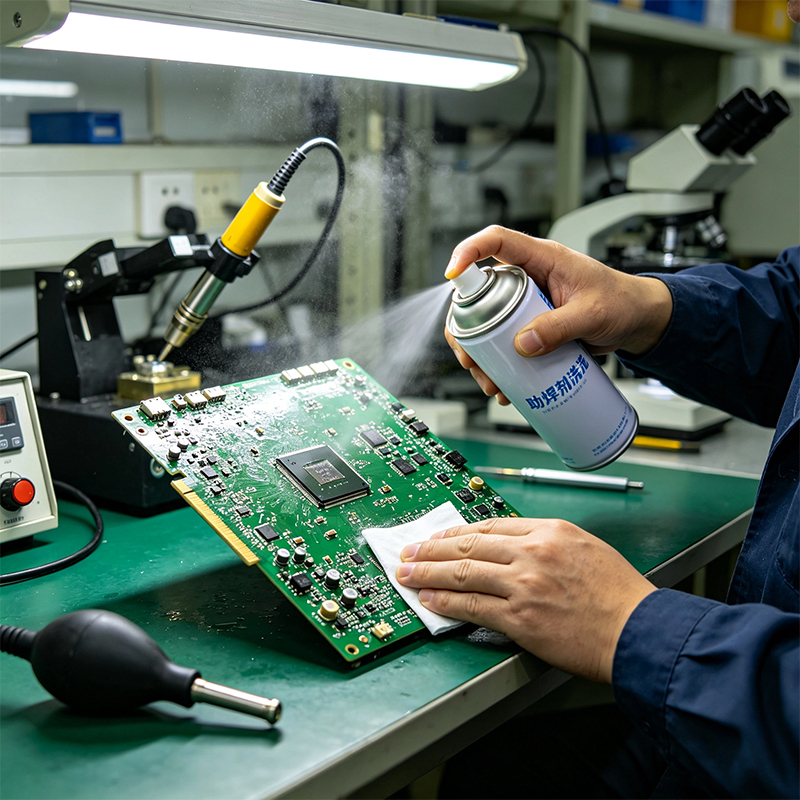
For heavily contaminated boards—corrosion, heavy oxidation, thick flux residue—you need a more thorough approach.
Ultrasonic Cleaning
An ultrasonic cleaner uses high‑frequency sound waves to create microscopic bubbles in the cleaning solution. When the bubbles collapse, the energy dislodges contaminants from tight spaces.
Steps:
Use distilled or deionized water (never tap water!)
If the flux residue is heavy, add a small amount of specialized cleaning agent
Place the board in the cleaner and run for 5‑10 minutes
Remove and blow dry with compressed air
Air‑dry completely or use a hair dryer on the cool setting
Ultrasonic cleaning warnings:
Don't clean crystals, batteries, relays, microphones, speakers—they can be damaged
Must dry completely—no water left behind
Don't use alcohol in an ultrasonic cleaner—fire hazard
For heavily oxidized pads and gold fingers, a pencil eraser can gently remove oxide to reveal a clean, shiny surface.
When cleaning circuit boards, never do these things:
1. Clean while powered on
Never clean a board that's powered up. You'll short components or—worse—get shocked.
2. Use tap water
Tap water contains minerals and ions that leave conductive residue after drying. Use distilled or deionized water only.
3. Use regular brushes
Regular brushes generate static electricity that can zap chips. Always use ESD‑safe brushes.
4. Soak for too long
Don't leave boards soaking for extended periods. Liquid can seep into connectors, relays, and other sealed components, causing internal corrosion.
5. Use high heat to dry
Hot air speeds drying but can melt plastic components or crack solder joints. Use cool air or low heat.
Cleaning circuit boards isn't complicated, but it's not just wiping with a rag either.
Light dust → ESD brush + compressed air
Flux residue / oil → IPA wipe (90%+ concentration)
Heavy contamination / corrosion → Ultrasonic cleaner + distilled water, then dry thoroughly
Oxidized gold fingers → Gently rub with a pencil eraser
Remember the four rules: power off, use ESD-safe tools, use the right cleaning agent, and dry completely. Clean boards work better, last longer, and fail less often. If a board is particularly valuable or the contamination is severe, consider professional cleaning—it's cheaper than replacing the board.

Kaboer manufacturing PCBs since 2009. Professional technology and high-precision Printed Circuit Boards involved in Medical, IOT, UAV, Aviation, Automotive, Aerospace, Industrial Control, Artificial Intelligence, Consumer Electronics etc..


 English


 Wechat
 +86 13670210335
 +86 13670210335
 E-mail