
Date: 2026-01-21
Ever held a circuit board and felt like you're looking at a foreign city map without a legend? You see a sea of tiny parts, squiggly lines, and cryptic codes. For anyone sourcing, testing, or integrating electronics, feeling lost is normal. But learning to read a circuit board is less about electrical engineering and more about learning a new visual language.
Think of it like this: A circuit board is a miniature city built to make electricity flow in a precise, orderly way. Your goal isn't to be the mayor who designed it, but to be a good tourist who can find the main landmarks and understand the traffic flow.
Let's take a tour. Here’s how to make sense of what you're seeing.
First, don't stare at the details. Look at the whole board.
Find the "Downtown": Where are the big, complex chips? These are usually the microprocessors, memory, or power regulators—the brains and muscles of the operation. They often anchor the board's design.
Spot the Power District: Look for large capacitors (shiny cylinders) and chunky components near the power input (where the cable plugs in). This is the city's power plant and water tower, storing and smoothing out electrical energy.
Identify the Connectors: These are the ports, headers, and sockets on the edge. They're the highways and train stations, the interfaces where data and power come in and go out to the rest of the world.
Now, look at the smaller parts. Each has a unique look and job. Here’s a quick "Who's Who":
Resistors (R): The traffic regulators. They limit the flow of electricity. They’re usually tiny rectangles with colored stripes or small black chips with numbers. Their value (in Ohms) is printed on them.
Capacitors (C): The tiny energy storage tanks. They store and release small bursts of power to smooth things out. Look for small tan or black chips (ceramic caps) or the shiny aluminum cylinders (electrolytic caps for bigger jobs).
Integrated Circuits (ICs or "Chips"): The office buildings and factories. These black rectangles with many legs (pins) do the complex work—computing, amplifying, controlling. The main code printed on them is their model number.
Diodes & LEDs (D): The one-way streets and traffic lights. Diodes let current flow in only one direction. LEDs (Light Emitting Diodes) are the ones that light up.
Inductors/Coils (L): Often look like small, colored doughnuts or tiny wire coils. They're like electrical flywheels, resisting changes in current.
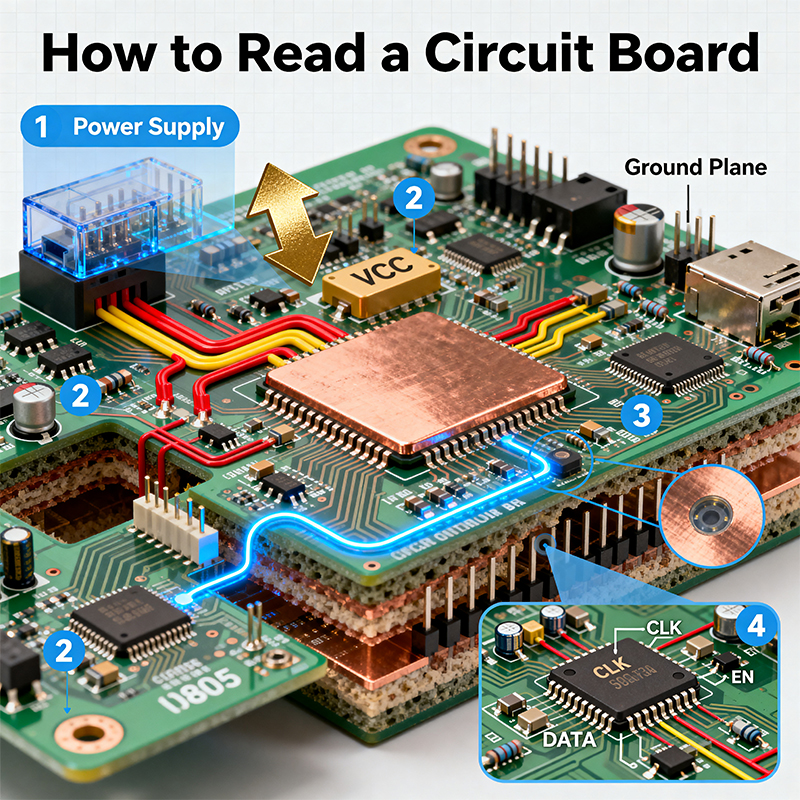
The copper pathways you see are the roads and streets of the city. They’re called traces.
Width Matters: A thick, fat trace is like a major highway—it’s likely carrying a lot of power. A thin, hairline trace is a small residential street, carrying a data signal.
Look for "Via" Manholes: You'll see tiny holes filled with metal. These are vias—they connect a "street" on one layer of the board to another layer below or above, like a multi-story interchange.
Follow the Flow: Often, you can trace from a connector (input), through some key components, to a main chip, and then out to another connector (output). This gives you a rough idea of the signal's journey.
The white (or sometimes yellow) printed letters and symbols are your map legend. This is the silkscreen.
Component Labels: You'll see codes like R17, C42, U5. This is the most important key!
The letter tells you the type: Resistor, Capacitor, Universal (usually a chip), L for Inductor, D for Diode.
The number is just its unique ID on that specific map (board).
Polarity & Orientation Marks: Look for + and - signs, dots, notches, or thick stripes on one end of a component. Putting a capacitor or battery in backwards can be disastrous. These marks show you the correct direction.
Test Points: Small pads labeled TP1, TP2. These are like checkpoints where engineers can hook up probes to take electrical "blood pressure" readings during testing.
Remember, you're only looking at the surface. A simple board has roads on two sides. A complex board (like in your phone) is a multi-layered metropolis, with 8, 12, or more layers of traces sandwiched inside. You can't see those, but you know they're there by the density of components and the many vias "dipping down" into the board.
You might think, "I'm not the designer; why do I need to read this?"
Better Communication: You can precisely point out an area of concern to your design team or PCBA supplier: "We're seeing failures near power regulator U7 and capacitor C22," instead of "something near the big chip."
Faster Troubleshooting: If a board fails a test, basic reading skills help you quickly spot physical issues: a cracked resistor (R10), a missing capacitor, or a solder bridge shorting two traces.
Informed Sourcing: Understanding board complexity (component count, density, layer count) helps you evaluate if a potential manufacturer like Kaboer has the right equipment and expertise. A board covered in tiny 01005 components needs a different factory than one with mostly large through-hole parts.
Learning to read a circuit board is about shifting your perspective. You stop seeing an abstract piece of tech and start seeing a logical, physical system. You won't understand every detail—that's the designer's job—but you'll gain the power to navigate it, discuss it intelligently, and make better decisions about the electronics you build or buy.
It turns a moment of confusion into a moment of clarity. And in the fast-paced world of electronics manufacturing, that clarity is invaluable. At Kaboer, we see this understanding as a bridge between our clients and our production floor—a shared language that helps us turn complex designs into perfectly realized physical products.

Kaboer manufacturing PCBs since 2009. Professional technology and high-precision Printed Circuit Boards involved in Medical, IOT, UAV, Aviation, Automotive, Aerospace, Industrial Control, Artificial Intelligence, Consumer Electronics etc..


 English



 Wechat
 +86 13670210335
 +86 13670210335
 E-mail