
Date: 2026-04-11
Have you ever opened up a piece of electronics—maybe a vintage radio or a modern power supply—and wondered why it just won’t kick into gear? More often than not, a tiny, cylinder-shaped component called a capacitor is the culprit.
Learning how to test a capacitor with a multimeter is a fundamental skill for any DIYer, engineer, or manufacturer. But before you go poking around with your probes, let’s get into the nitty-gritty of doing it safely and accurately.
Here is the "Golden Rule": Always discharge the capacitor before testing. Capacitors are like tiny batteries; they store energy even after the power is turned off. If you try to test a charged capacitor, you won't just get an inaccurate reading—you might blow up your multimeter or get a nasty shock.
To discharge it safely, use a high-wattage resistor (like 1k or 10k ohms) and bridge the terminals. Avoid the "sparky" method of using a screwdriver if you can; it’s not great for the component’s lifespan!
Before we even touch the multimeter, use your eyes. In our PCBA facility, we often spot bad capacitors during the AOI (Automated Optical Inspection) stage. Look for:
Bulging tops: If the top is slightly domed, it’s toast.
Leaking fluid: Any crusty brownish residue at the base is a red flag.
The Smell: Burnt electrolytes have a very distinct, unpleasant fishy odor.
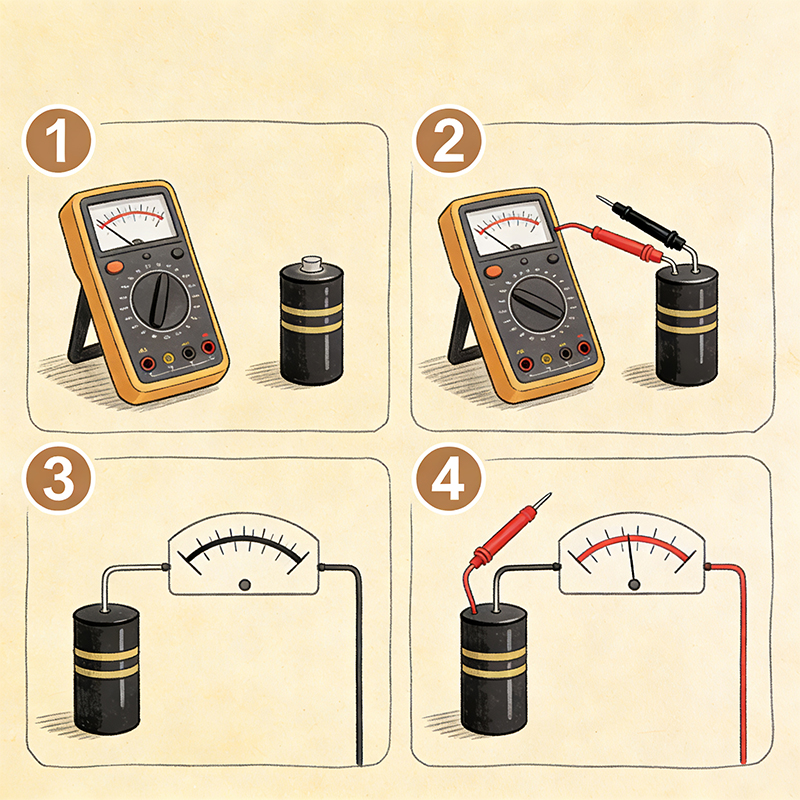
If your multimeter has a "Capacitance" setting (usually the $\dashv \vdash$ symbol), this is the most accurate way to go.
Set the Dial: Turn your multimeter to the capacitance mode.
Probe the Leads: Connect the red probe to the positive (longer) lead and the black to the negative.
Wait for the Reading: Capacitors take a second to "charge" from the meter's battery.
Compare: If the capacitor says $100\mu F$ and your meter reads $95\mu F$, you’re likely fine. If it reads $20\mu F$ or "OL" (Open Loop), it’s dead.
What if your meter is basic and doesn't have a capacitance mode? You can still test it using the Ohms ($\Omega$) setting. This is a "qualitative" test—it tells you if the capacitor is working, but not its exact capacity.
Set the multimeter to a high resistance range ($10k$ or $1M$ ohms).
Touch the leads. You should see the resistance start low and slowly crawl toward infinity.
The Logic: This shows the capacitor is absorbing the tiny current from the meter. If the reading stays at zero, it’s shorted (circuit shorting). If it stays at infinity immediately, it’s an open circuit.
Things get tricky when you’re dealing with High-Speed HDI boards or custom Flexible PCBs. These boards use tiny SMD (Surface Mount Device) capacitors that are often as small as a grain of sugar.
Testing them "in-circuit" (while still soldered) is usually unreliable because the rest of the components interfere with the reading. In our manufacturing process, we use "In-Circuit Testing" (ICT) fixtures to isolate these components. For a DIYer, you’ll almost always need to desolder one leg of the capacitor to get a "real" truth.
A faulty capacitor can cause anything from a flickering screen to a complete system failure. Whether you’re troubleshooting a Rigid-Flex board or a simple toy, knowing how to test a capacitor with a multimeter puts the power back in your hands.
If you find yourself constantly replacing caps on your designs, it might be time to look at the board quality itself. High-quality manufacturing ensures that components are handled with the right thermal profiles to prevent early capacitor death!

Kaboer manufacturing PCBs since 2009. Professional technology and high-precision Printed Circuit Boards involved in Medical, IOT, UAV, Aviation, Automotive, Aerospace, Industrial Control, Artificial Intelligence, Consumer Electronics etc..


 English



 Wechat
 +86 13670210335
 +86 13670210335
 E-mail