
Date: 2026-02-27
Ever found yourself squinting at a tiny SMD component, trying to guess its package size? Or maybe you've spent five minutes searching online for a resistor color code chart? If you work with electronics, you know these little moments add up. That's exactly why someone invented the PCB ruler.
A PCB ruler isn't just for measuring things in millimeters and inches—although it does that just fine. Think of it more like a reference library that fits in your pocket . It's a specialized tool made from the same materials as circuit boards (usually FR-4 fiberglass) that packs a ton of useful information right onto its surface .
This guide walks you through everything you need to know about these handy tools—what they are, what they can do, how to choose one, and even how to make your own.
At its simplest, a PCB ruler is a measuring tool made from printed circuit board material. But calling it just a "ruler" is like calling a smartphone just a "phone." It does so much more.
Most PCB rulers are made from FR-4 fiberglass, the same stuff regular circuit boards are made of . They're rigid, durable, and often finished with gold-plated pads that look great and resist tarnishing . You'll find them in various lengths—15cm, 20cm, 25cm, and 12-inch versions are common .
But here's the thing: a PCB ruler's real value isn't in measuring length. It's in all the extra information printed or etched onto it . Think of it as a cheat sheet for electronics that's always on your bench.
Open up any decent PCB ruler, and you'll find a surprising amount of useful stuff. Here's what's typically included:
This is probably the most useful feature. You know those tiny SMD components that all look the same? A PCB ruler shows you actual-size outlines of common packages . Just hold your component up to the ruler and match it to the outline. Common ones include:
Passive components: Resistor and capacitor packages like 0603, 0805, 1206
IC packages: SOP-8, SOP-16, TSSOP, QFP, and even BGA footprints
Diodes and transistors: SOD-323, SOD-123, SOT-23
LEDs: Common SMD LED sizes like 0603LED, 0805LED, 2835, 3528, 5050
Crystals: 3215, 3225, and other common oscillator footprints
How wide is a 10 mil trace? What about 0.25mm? A PCB ruler gives you actual printed traces in various widths so you can see exactly what you're designing . This is invaluable when you're laying out a board and want to visualize how much space a trace will actually take up.
Many rulers also include trace width ampacity charts, showing you how much current different trace widths can safely carry . No more guessing whether your power trace is thick enough.
Need to know what size hole fits an AWG 24 wire? PCB rulers often have drilled holes of various diameters . Just poke your wire through and find the hole that fits snugly. This is perfect for identifying wire gauges or checking drill bit sizes.
Common sizes range from 0.4 mm up to 2 mm for through-hole examples , and some include AWG wire gauge references .
Ever wondered how big a 20 mil font actually looks on a silkscreen? PCB rulers include actual printed text in various heights so you can see what's readable and what's too small . This saves you from designing illegible text onto your boards.
What's the difference between 0.5mm pitch and 0.8mm pitch? On a ruler, you can see it side by side . Pitch examples help you identify connectors and fine-pitch ICs at a glance.
Metric to imperial? Fractions to decimals? Resistor color codes? Many PCB rulers pack in these handy conversion references . Some even include Ohm's Law and power equations right on the ruler .
Some advanced PCB rulers go all out and include pinout diagrams for popular microcontrollers . You might find references for Arduino Nano, Raspberry Pi Pico, or Teensy boards printed right on the ruler—no more digging through datasheets.
The Adafruit PyRuler takes things to another level—it's not just a ruler, it's actually a working CircuitPython microcontroller . It has capacitive touch pads that can type special characters like Ω, µ, and π when you touch them. Now that's a ruler that does double duty.
These are the most common. They pack in as much reference information as possible—package outlines, trace widths, drill sizes, conversion charts. Companies like DigiKey offer their own versions with a great selection of features .
Many electronics companies give away custom PCB rulers as promotional items at trade shows. They're functional tools that also serve as brand reminders. Some are beautifully designed with company logos and custom color schemes.
Some designers release their PCB ruler designs as open-source files . You can download the Gerbers and have your own made. This is a great option if you want a ruler tailored to your specific needs.
Like the Adafruit PyRuler, some PCB rulers include actual working electronics . They're rulers that also blink, sense touch, or run code. These are more niche but incredibly cool.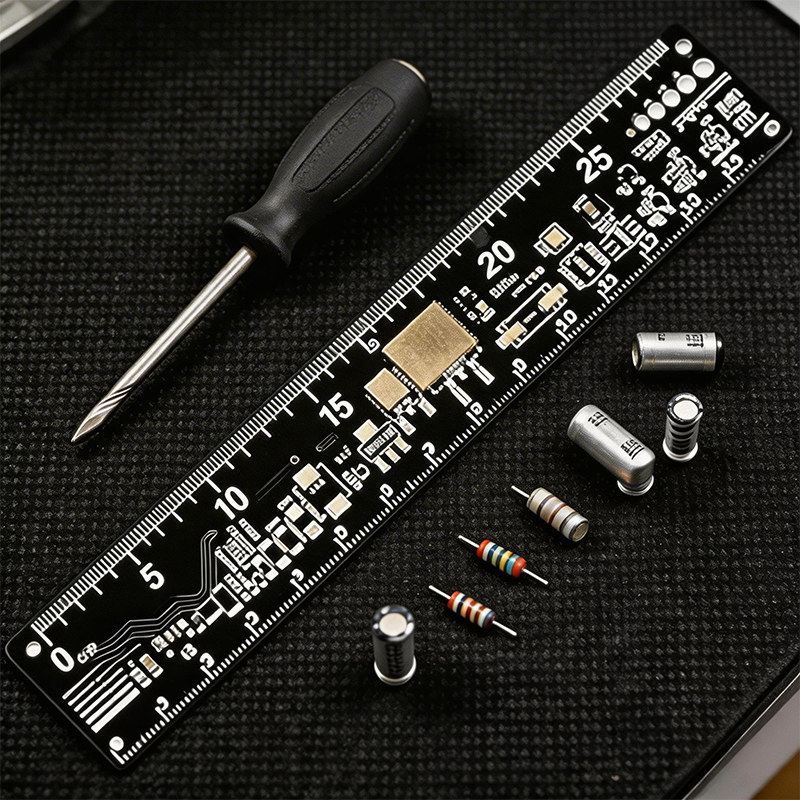
Not all PCB rulers are created equal. Here's what to look for :
The ruler's measurements should be precise and reliable. Look for rulers made with good manufacturing processes. The markings should be clear and correctly positioned.
Since you'll be using it on your workbench, it should be made from sturdy materials . FR-4 is standard and holds up well. Gold-plated pads resist corrosion and look professional .
Different rulers have different features. Think about what you actually need:
Do you work mostly with SMD passives? Look for good package outlines.
Designing power boards? Make sure it has trace width ampacity charts.
Teaching electronics? A ruler with color codes and conversion charts helps students.
The markings should be clear and easy to read . High-contrast silkscreen and well-defined copper features make a big difference.
Consider where you'll use it. A 6-inch (15cm) ruler fits nicely in a pocket or drawer. A 12-inch version gives you more space for information but takes up more room on your bench .
If you can't find exactly what you want, or you just enjoy the design process, making your own PCB ruler is surprisingly straightforward . Here's how:
Decide what information you want on your ruler. Common choices include :
Package outlines for the components you use most
Trace width examples
Drill hole sizes
Font height samples
Conversion charts
Your logo or a cool design
Open up your favorite PCB design tool—KiCad, Eagle, Altium, or EasyEDA all work . Create a board with your desired dimensions. Most rulers are 15cm or 6 inches long, and around 25-30mm wide.
This is the fun part. Draw component outlines on the silkscreen layer. Add text for labels and values. Create copper features for trace width references. Place pads for the drill holes you want .
Pro tip: When designing drill holes for wire gauges, make them slightly smaller than the nominal wire size so wires fit snugly .
Before sending it to fabrication, verify all your measurements . Compare your ruler design to a calibrated reference. Make sure text is readable and features are correctly positioned.
Export your design in Gerber format and send it to a PCB manufacturer . Specify your material (FR-4 is standard), thickness (1.6mm works well), and surface finish (ENIG/gold looks professional). Order a panel with multiple copies so you have spares to share.
When your rulers arrive, test them out . Check accuracy, readability, and usefulness. If something's off, tweak the design and order another batch.
Let's walk through what you might find on a well-designed PCB ruler, based on real-world examples :
Metric measurements along the edge, usually in millimeters
Resistor color code chart or at least the color values
Ohm's Law and power equations (V=IR, P=VI)
Metric prefixes from pico to tera
Trace width examples from hair-thin to chunky
Metric-to-imperial conversions
A protractor for measuring angles
Imperial measurements in inches, often with finer divisions at the start
AWG wire gauge holes with sizes printed next to them
Transistor and diode symbols as memory aids
Fraction-to-decimal conversion tables
Morse code (because why not?)
Digits of π for when you need pointless precision
Machine screw and drill size references
If you're still not convinced, here's why a PCB ruler earns its place on every electronics bench:
It saves time. No more searching for datasheets or opening browser tabs just to check a package size. Look at the ruler, find your answer, keep working.
It prevents mistakes. When you can see exactly what a 0402 package looks like next to a 0603, you won't accidentally order the wrong components .
It's always there. Unlike a bookmarked webpage or a printed chart, your ruler is physically on your bench . You'll use it because it's right there.
It's a conversation starter. PCB rulers are cool. They show you're serious about electronics, and they often lead to interesting discussions with other engineers.
It's customizable. If you don't like what's out there, you can design your own. That's a level of personalization you don't get with a plastic ruler from the office supply store.
A PCB ruler is one of those tools you don't realize you need until you have one. Then you wonder how you ever managed without it.
Whether you buy one from a distributor, get one as swag at a conference, or design your own custom version, this simple tool will make your electronics work faster, more accurate, and maybe even a little more fun.
So next time you're placing an order with a PCB manufacturer or browsing an electronics supplier's website, throw a PCB ruler into your cart. Your future self—squinting at a tiny component and wishing for a quick reference—will thank you.

Kaboer manufacturing PCBs since 2009. Professional technology and high-precision Printed Circuit Boards involved in Medical, IOT, UAV, Aviation, Automotive, Aerospace, Industrial Control, Artificial Intelligence, Consumer Electronics etc..


 English



 Wechat
 +86 13670210335
 +86 13670210335
 E-mail