
Date: 2026-02-27
Ever wondered how hundreds of tiny components on a circuit board get stuck in exactly the right spots? The answer lies in the first critical step of the SMT line—solder paste printing.
If assembling a circuit board is like building a house, solder paste printing is the foundation. A bad foundation ruins everything—no matter how good the walls and finishing are. Same with SMT printing: if you get it wrong, no amount of precision placement or perfect reflow can save the board.
There's a saying in the industry: most defects on an SMT line trace back to the printing step. Too much paste causes shorts. Too little causes cold joints. Misaligned paste means components won't sit right. This seemingly simple process determines the fate of the entire board.
This guide walks you through SMT printing in plain language—what it is, how it works, how to set parameters, and how to fix common problems.
Simply put, SMT printing is applying solder paste onto the pads of a circuit board.
What's solder paste? It's a grayish, sticky paste made of tiny solder balls mixed with flux. It does two jobs: temporarily glues components in place, and later melts to form permanent electrical connections.
The process is like printing with a stencil:
The PCB is the paper
The stencil is the stencil with cut-out letters
Solder paste is the ink
The squeegee is the brush
Place the stencil over the PCB, push paste across with a squeegee, and paste goes through the openings onto the pads. Lift the stencil, and you've got precise dots of paste on every pad.
Simple in concept, but doing this on pads finer than a human hair, with micron-level precision, is anything but simple.
Without a stencil, there's no printing. Stencil quality directly determines print quality.
Most stencils are stainless steel, typically 0.1mm to 0.2mm thick. Laser-cut openings match the PCB pad locations exactly.
Framed stencils: Stainless steel stretched over an aluminum frame. Flat and stable, ideal for high-volume automated lines.
Frameless stencils: Just the foil. Can be rolled up for storage. Great for prototypes and low-volume production.
Chemically etched: Old method. Uses chemicals to dissolve holes. Cheap but low precision. Being phased out.
Laser-cut: Industry standard. Lasers burn precise holes. High accuracy, smooth walls. Adding electropolishing after cutting makes walls even smoother for better paste release.
Electroformed: Premium method. Builds the stencil additively. Mirror-smooth walls, extreme precision. Expensive and slow, used only for ultra-fine pitch components.
Thicker stencils deposit more paste. But too thick, and paste won't release from small openings.
Engineers use two key ratios :
Aspect ratio: Opening width ÷ stencil thickness. Target >1.5.
Area ratio: Opening area ÷ hole wall area. Target >0.66.
Example: a 0.3mm pitch QFP chip has pads only 0.18mm wide. With a 0.15mm thick stencil, area ratio might drop to 0.5, making paste release difficult. Solution: use a thinner stencil, like 0.1mm.
Openings aren't exactly pad-sized. They're usually 5%-10% smaller. Why? To prevent excess paste that causes bridging. Some components need special aperture shapes—like "window-pane" patterns on large thermal pads to prevent component floating.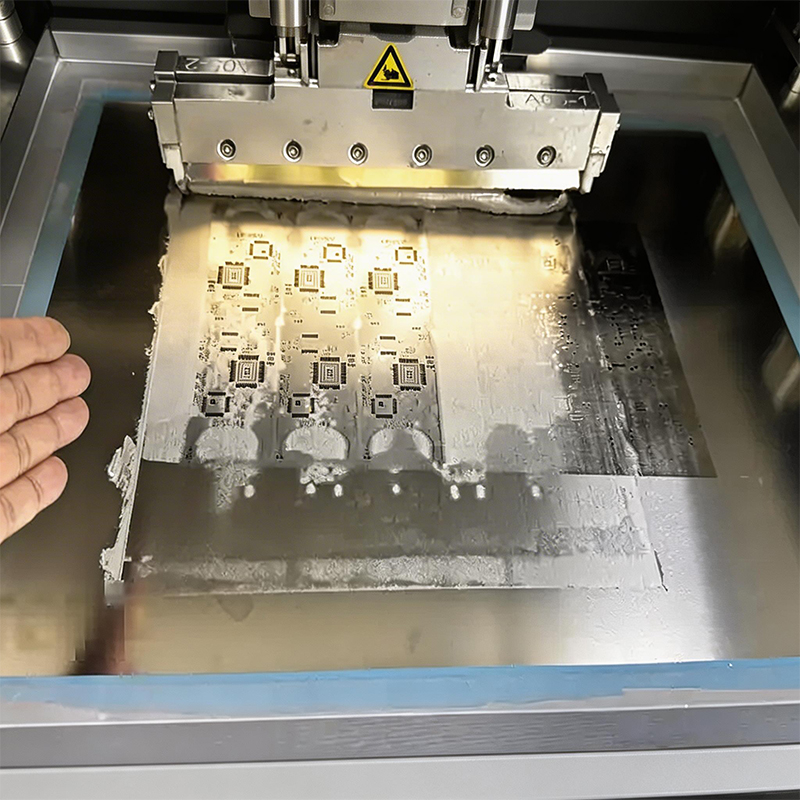
Good stencil needs good settings. Key parameters determine print quality:
The squeegee pushes paste through openings.
Pressure: Too low leaves paste on the stencil. Too high "scoops" paste out of openings, causing insufficient deposits. Rule of thumb: 1 kg per 50mm of squeegee length. For a 300mm squeegee, start at 6kg, then fine-tune.
Speed: Too slow kills throughput. Too fast—paste can't fill small openings. Typical range: 20-50 mm/s. High-precision work can go as low as 5-10 mm/s.
Highly overlooked but critical. After printing, the stencil lifts from the PCB. If it lifts too fast, paste sticks to hole walls, forming "tailing" or getting pulled off pads.
Separation should be slow—typically 0.5-3 mm/s. The initial lift is the most critical. Let paste "decide" to stay on pads.
Some printers offer separation delay: pause 0.5-1 second before lifting.
Stencils get dirty. Paste builds up on the bottom, eventually smearing on boards and causing shorts. Typical cleaning every 5-10 prints. Adjust based on paste type and print quality.
How do you know if printing is good? Not by eye. You use SPI (Solder Paste Inspection).
SPI uses 3D laser scanning to measure every paste deposit—height, area, volume, and position accuracy. Resolution can reach 15 microns.
Good SPI systems:
Inspect 100% of boards
Scan each frame in 0.25 seconds
Feed data back to the printer for real-time adjustments
With SPI, printing isn't a black box anymore. Data tells you: pressure too high? Separation too fast? Next board prints better. That's closed-loop control.
Defects happen. Here's what to do when they do:
| Defect | What It Looks Like | Possible Causes | Fixes |
|---|---|---|---|
| Insufficient solder | Pads not fully covered | Clogged apertures, low pressure, high speed | Clean stencil, increase pressure, lower speed |
| Bridging | Adjacent pads connected | Too much paste, misalignment | Check stencil thickness, check alignment |
| Tailing | Paste has peaks | Separation too fast | Slow separation, add delay |
| Slumping | Paste spread out, blurry edges | Paste too thin, left too long | Check paste viscosity, shorten waiting time |
| Misalignment | Paste off-center | Stencil misaligned | Realign, check tooling holes |
Not all solder pastes are equal. Key specs :
Alloy: Mainstream is lead-free SAC305 (tin-silver-copper). Melts at 217-221°C.
Particle size: Type 3 = 25-45 microns. Type 4 is finer. Fine-pitch needs fine powder.
Viscosity: Typically 80-120 kcps. Too thin slumps, too thick won't print.
Paste goes in the fridge. Before use, bring it to room temperature—usually 2-4 hours. Once opened, use within 2 hours. Paste absorbs moisture from air; if not handled right, it can "popcorn" during reflow, spattering everywhere.
SMT printing sounds complex, but core principles are simple:
Stencil is everything: Right thickness, right openings, laser-cut + electropolished is safest bet.
Tune parameters: Pressure, speed, separation—get them right. Start with recommended values, then fine-tune.
SPI is your friend: Let data guide you, not guesses.
Clean often: Clean stencil, fewer defects.
Paste needs respect: Refrigerate, warm up, use promptly.
Get printing right, and the rest of the SMT line runs smooth. Like building a house: get the foundation right, and everything else stands firm.

Kaboer manufacturing PCBs since 2009. Professional technology and high-precision Printed Circuit Boards involved in Medical, IOT, UAV, Aviation, Automotive, Aerospace, Industrial Control, Artificial Intelligence, Consumer Electronics etc..


 English



 Wechat
 +86 13670210335
 +86 13670210335
 E-mail