
Date: 2026-03-23
If you've ever tried to build a circuit without a diagram, you know the feeling. Wires going everywhere. Connections that made sense in your head but don't work on the bench. Hours wasted chasing a mistake that would have been obvious on paper.
That's why wire diagrams exist. They're the bridge between an idea in your head and a physical circuit that actually works. But not all diagrams are the same, and knowing how to read and use them can save you a lot of time and money.
Let's break down what wire diagrams actually are, how they're different from schematics, and why they matter when you're building electronic products.
A wire diagram (sometimes called a wiring diagram or interconnection diagram) is a visual representation of how components are physically connected . It shows the actual wiring paths between components, connectors, and terminals in a way that reflects how things are laid out in the real world.
Think of it as a map of your electronic system. Unlike a schematic, which focuses on the logical flow of electricity, a wire diagram shows you where the wires actually go—which pin connects to which pin, which wire color goes where, and how everything physically fits together.
For complex systems with multiple boards, cables, and connectors, a good wire diagram is essential for assembly, troubleshooting, and maintenance.
This is a common point of confusion, so let's clear it up.
| Feature | Schematic | Wire Diagram |
|---|---|---|
| Purpose | Shows logical circuit function | Shows physical connections |
| Focus | How electricity flows | Where wires actually go |
| Layout | Arranged for clarity, not physical location | Arranged to reflect physical layout |
| Components | Symbols | Realistic shapes or outlines |
| Best for | Design, analysis, simulation | Assembly, troubleshooting, field service |
A schematic is like a city map. It shows you the roads and intersections, but not exactly what the buildings look like or where the trees are. A wire diagram is like a detailed building floor plan. It shows you exactly where every outlet, switch, and wire is located.
You need both. The schematic tells you what should happen electrically. The wire diagram tells you how to make it happen physically.
A well-drawn wire diagram tells you everything you need to know to build, test, or repair a system:
Component representations: Each component—connectors, PCBs, switches, power supplies—is shown with its physical shape or a clear outline.
Pin numbers and labels: Every connection point is labeled so you know exactly where to attach wires.
Wire identification: Each wire is marked with its gauge, color, and sometimes a unique number or label.
Connection points: Clear indication of where wires terminate—screw terminals, solder pads, crimp pins.
Cable routing: For complex systems, the diagram shows how cables are routed through enclosures, which cables are bundled together, and where they enter and exit.
Reference to schematics: A good wire diagram cross-references the schematic, so you can trace a physical wire back to its logical signal.
If you're having boards assembled, the manufacturer needs to know not just what to put on the board, but how to connect everything together. Here's where wire diagrams come in:
Cable and harness assembly. When your product includes wiring between boards, connectors, and external interfaces, the assembler needs to know which wire goes where. A wire diagram is the instruction manual for building those cables.
Test and debug. When something doesn't work, technicians use wire diagrams to trace signals through the system. They need to know where to probe and what should be connected to what.
Field service. If your product will be repaired or serviced in the field, service technicians need clear documentation. A wire diagram is essential for troubleshooting.
Documentation. Years from now, someone will need to understand how your product was built. A wire diagram is part of that permanent record.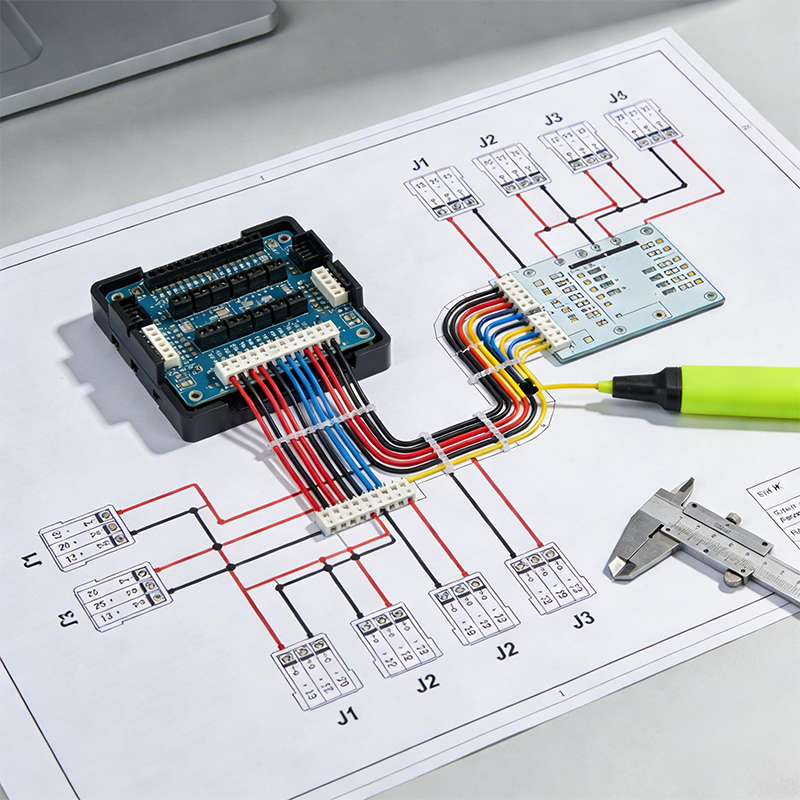
Wire diagrams use a mix of schematic-style symbols and physical representations. Here are some common elements:
Connectors: Usually shown as rectangles or circles with pin numbers. Sometimes a simplified outline of the actual connector.
Wire-to-wire splices: Dots or junctions where multiple wires connect.
Shielded cables: Represented by a dashed line around the conductors, often with a drain wire shown.
Ground connections: Usually a ground symbol or a terminal point labeled "GND."
Terminal blocks: Shown as strips with numbered terminals.
The key is that symbols should be clear enough that anyone with basic training can understand them without constant reference to a legend.
When you're developing a custom PCB, wire diagrams serve several purposes:
At the design stage. You'll create a wire diagram to map out how your board connects to other components—sensors, displays, power supplies, connectors. This helps you determine what connectors your board needs and where to place them.
During assembly. For boards that have external wiring, the assembly team uses the wire diagram to know which wires go to which connectors and how to route them.
For testing. Test engineers use the wire diagram to set up test fixtures and to understand what signals should be present at each connector.
For integration. If your board is part of a larger system, the system integrator needs a wire diagram to connect everything correctly.
If you're responsible for producing wire diagrams, here are some tips from people who have to use them:
Keep it clean. Cramming too much information onto one page makes it useless. Break complex systems into multiple diagrams if needed.
Use consistent labeling. Wire numbers, pin numbers, and connector labels should match the physical parts. If the connector has "Pin 1" molded into the plastic, that's what you should call it.
Show wire colors. If your wiring uses colored wires, show the colors on the diagram. This makes assembly much faster and reduces errors.
Include a legend. Not everyone knows your shorthand. Explain what symbols mean.
Cross-reference. Include references to schematic page numbers and component designators so users can switch between diagrams easily.
Update when things change. A wire diagram that doesn't match the actual hardware is worse than no diagram at all.
Modern wire diagrams are rarely drawn by hand. Most are created using CAD tools that integrate with PCB design software.
ECAD/MCAD integration: Tools like Altium, SolidWorks, and AutoCAD Electrical allow you to create wire diagrams that stay synchronized with your PCB layout. When you move a connector on the board, the diagram updates automatically.
Intelligent wire lists: Advanced tools generate wire lists—tables that show every connection, wire length, color, and termination—directly from the diagram. This saves hours of manual data entry.
3D wire diagrams: For complex enclosures, you can create 3D wire diagrams that show cable routing in actual space, helping to avoid interference and ensure proper clearances.
Using schematic symbols in a wire diagram makes it hard for assembly technicians to find physical components.
Fix: Use physical representations for connectors, switches, and components. Save the schematic symbols for the schematic.
Wires that aren't labeled lead to guesswork during assembly.
Fix: Every wire should have a unique identifier—a number, a color code, or both.
A diagram with 50 wires on one page is unreadable.
Fix: Break complex systems into multiple diagrams. A reader should be able to follow a single connection without getting lost.
Pin 1 on the diagram should match Pin 1 on the physical connector.
Fix: Always verify pin numbering against the actual connector datasheet.
At Kaboer, we've been building custom PCBs since 2009. Based in Shenzhen with our own PCBA factory, we work with wire diagrams every day—both for our internal assembly and for clients who need help connecting their boards into larger systems.
What we do with wire diagrams:
Review: We check your wire diagrams for consistency with your PCB layout before assembly.
Build: Our assembly technicians follow wire diagrams to connect cables, harnesses, and external components.
Test: We use wire diagrams to set up test fixtures and to verify connections during functional testing.
Document: We can generate as-built wire diagrams that reflect the final assembly.
We work with the full range of boards—rigid, flexible, rigid-flex, HDI—and we understand that wire diagrams need to account for the unique characteristics of each.
If you're working on a project that needs clear, accurate wire diagrams—or if you need help turning your wire diagrams into finished products—send us your requirements or Gerber files. We'll review your design, give you honest feedback, and get back to you with a quote. We've been at this for over 15 years, and we believe the best partnerships start with straightforward conversations.
And if you're ever in Shenzhen, we'd be happy to show you around our factory and walk you through how we turn wire diagrams into real, working hardware.

Kaboer manufacturing PCBs since 2009. Professional technology and high-precision Printed Circuit Boards involved in Medical, IOT, UAV, Aviation, Automotive, Aerospace, Industrial Control, Artificial Intelligence, Consumer Electronics etc..


 English



 Wechat
 +86 13670210335
 +86 13670210335
 E-mail